
Rated
based on
85,278+
85.3k
reviews
Instant Download
100% Money Back Guarantee
24/7 Support
 Xbox Account
 Worldwide
 Delivery time may take up to 24 h.
Instant Download
100% Money Back Guarantee
24/7 Support
Xbox Account
Worldwide
Delivery time may take up to 24 h.
You will be sent a new account preloaded with the game. No refunds will be issued for banned accounts. Please read our Terms in the description.
TERMS:
1. This is NOT a game key. You will be sent a new Xbox account made for you and preloaded with the game.
2. Under certain conditions, (e.g. customer error when making order, incorrect game/account delivered) or any error in the ordering process. Please contact us to determine the eligibility for refunds and returns.
3.The following circumstances are NOT ELIGIBLE FOR REFUNDS/RETURNS.
3a. Accounts with more than 1 hour of playtime.
3b. Accounts banned /locked for any of the following reasons:
- Adding funds to the account's wallet risks a ban as well. Thus, please avoid adding funds to the account.
- Changing the country
Includes:
*The designs have been remade based on the original Virtua Fighter designs.
**The original Virtua Fighter stages cannot be used at the online matches.
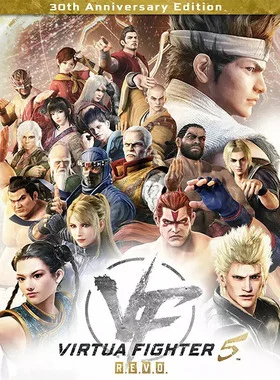
Celebrate the 30th anniversary of the first 3D fighting series with this luxurious anniversary edition, available on Steam for the first time. Get your hands on the exclusive set of character customization items featuring SEGA's legendary consoles with the Pre-Order Bonus!
Will your Kung-fu be enough?!
The legendary fighting series makes its Steam debut with Virtua Fighter 5 R.E.V.O.! Challenge the greatest fighters in the world in the ultimate remaster of the classic 3D fighter,now featuring Rollback netcode support, gorgeous 4K graphics, and all the bone-crunching, martial arts combat of the renowned original. Battle through classic VF modes like Arcade or Rank Match, create your own custom online tournaments and leagues with up to 16 players, or learn from the best in Spectator Mode. Master your fighting style to defeat all challengers in the Fifth World Fighting Tournament and become a Virtua Fighter legend!
Features:

1. Use the credentials you received (directly or via an external website) and log into the account.
2. Make sure that the content on the account is correct (correct edition of the game, no playtime etc.)
3. Add the purchased account to your console and set it as Xbox home account:
Purchased account has to be added as a new user, not as a guest
30 Xbox Series X S How to Make Account Primary!
4. Change the credentials to make the account your own:
- Change the email
- Change the password
- Add 2FA
NOTE: Applying any changes to the purchased account, such as adding a payment method or changing the region, may result in the account being banned. In such cases, no refund is applicable.
5. Once the account is added to your console (as a Xbox home account), download the game and switch back to the account you would like to play from. This way your progress will be saved on the account you are using.
6. The account should be used as a way of accessing the game/content you are interested in. It is not recommended to use it as your main account, as you might have issues with making purchases on it.
Be the first to review this product!
Why our Customers Love Us
Rated Excellent
Saved a ton on Office 2021. Got my key immediately and it activated without a hitch. EF is the real deal!
by Verified Buyer
Bought a PS Plus membership, code in seconds. Had a minor issue, support resolved it fast. Very impressed!
by Verified Buyer
Doubted a deal this good, but a friend insisted. My Windows 10 Pro key arrived instantly and works perfectly.
by Verified Buyer
Bought Office 2021 at 2am and got my key immediately. I didn’t expect delivery at that hour. Outstanding!
by Verified Buyer
Overseas but still got my code instantly. Xbox Live Gold code redeemed with no region issues. Impressed!
by Verified Buyer
Got Windows 10 Pro & Office 2021 far cheaper than retail. Both keys arrived instantly and activated fine.
by Verified Buyer
Got a Steam game key cheap. Code came instantly, I was playing within minutes of purchase. Can’t beat that!
by Verified Buyer
Bought Windows 11 Pro dirt cheap. Key arrived instantly and activated without issues. Truly 100% legit!
by Verified Buyer
First purchase, was cautious. Fast delivery and legit PS Plus code won me over. I’ll be a repeat buyer.
by Verified Buyer
Bought an Amazon gift card at a discount. Code arrived in seconds and worked perfectly. A lifesaver!
by Verified Buyer
Bought an Xbox Game Pass code at an unbeatable price. Arrived in my email within seconds. Beyond satisfied!
by Verified Buyer
Windows 11 Pro key seemed too cheap. 80k+ reviews convinced me to try them. Code arrived instantly and worked.
by Verified Buyer
Join the EF Army for exclusive member benefits




Share