
حاصل على تقييم
بُناءً على
53,801+
53.8k
مراجعة
تنزيل فوري
ضمان استرداد الأموال بنسبة 100%
دعم فني 24/7

 Windows PC
 Worldwide
 تنزيل إلكتروني فوري
حاصل على تقييم ممتاز

بُناءً على 53,801+ مراجعة
A reliable experience from purchase to activation. Consistently excellent.
Verified Buyer
Efficient purchase and prompt service—I’ve never been disappointed.
Verified Buyer
I've been a customer for 15 years. Unmatched service and reliable key delivery.
Verified Buyer
I received my PlayStation Plus key promptly, and the setup was effortless.
Verified Buyer
The ordering process was smooth and uncomplicated. Ideal for busy gamers.
Verified Buyer
Windows 11 Pro worked perfectly out of the box—reliable and trustworthy.
Verified Buyer
تنزيل فوري
ضمان استرداد الأموال بنسبة 100%
Windows 10 Home 32 64 BIT OEM
Windows PC
Worldwide
تنزيل إلكتروني فوري
A reliable experience from purchase to activation. Consistently excellent.
Verified Buyer
Efficient purchase and prompt service—I’ve never been disappointed.
Verified Buyer
I've been a customer for 15 years. Unmatched service and reliable key delivery.
Verified Buyer
I received my PlayStation Plus key promptly, and the setup was effortless.
Verified Buyer
The ordering process was smooth and uncomplicated. Ideal for busy gamers.
Verified Buyer
Windows 11 Pro worked perfectly out of the box—reliable and trustworthy.
Verified Buyer
قبل الشراء، ضع هذه الأشياء في الاعتبار:
1. أنت تحصل فقط على مفتاح منتج Windows OEM. بعد شرائه، ستحصل على رابط التنزيل والمفتاح في تفاصيل طلبك.
2. لا يمكنك استخدامه للترقية مباشرة من نظام تشغيل قديم.
3. سيتعين عليك إجراء تثبيت نظيف، لذا تأكد من نسخ جميع بياناتك المهمة احتياطيًا قبل البدء.
4. بمجرد تثبيته، لن تتمكن من التبديل إلى طراز مختلف للوحة الأم.
قبل إجراء عملية الشراء، يجب أن تعلم أن مفاتيح منتجات OEM غالبًا ما تكون أرخص من مفاتيح البيع بالتجزئة. ومع ذلك، فإنها توفر نفس البرنامج. وفقًا لقواعد Microsoft، بمجرد استخدام مفتاح OEM لتنشيط Windows على جهاز كمبيوتر، يتم ربطه باللوحة الأم لهذا الكمبيوتر. لا يمكنك نقله بسهولة إلى كمبيوتر آخر لاحقًا.
لذلك، قبل الشراء، إليك بعض النقاط التي تحتاج إلى فهمها.
لا، للأسف، لا يمكنك ترقيته مباشرة من نظام تشغيل قديم. سيتعين عليك إجراء تثبيت نظيف بدلاً من ذلك.
هذا يعني مسح القرص الصلب الخاص بك قبل تثبيت Windows، لذلك لا تنس نسخ جميع ملفاتك المهمة احتياطيًا.
بالتأكيد! بمجرد إجراء عملية الشراء، ستتلقى مفتاح المنتج الخاص بك وإرشادات حول كيفية تنزيل Windows 10 Home 32 64 بت لتنزيل OEM USB.
يهدف Windows 10 إلى جعل حياتك أسهل وأسرع. يتيح لك الغوص مباشرة في التطبيقات والملفات المفضلة لديك، حتى تتمكن من إنجاز المهام في لمح البصر. باستخدامه، يمكنك أيضًا متابعة الأمور من خلال الإشعارات المجمعة معًا بشكل ملائم.
هل هناك الكثير من عوامل التشتيت من حولك وتحتاج فقط إلى الاستمرار في التركيز؟ لا توجد مشكلة! يتيح لك Windows 10 تنظيم تطبيقاتك بسهولة وإنشاء أجهزة سطح مكتب جديدة وترتيب شاشاتك بالطريقة التي تريدها. أفضل جزء هو أنه يعمل بسلاسة مع الأجهزة التي لديك بالفعل ويبرز أفضل الأدوات الجديدة مثل 2 في 1. أوه، ومجرد تنبيه، لن يعمل نظام التشغيل Windows 10 مع نظام التشغيل Windows Vista.
تذكر أن هذا المفتاح مخصص للتثبيت النظيف فقط، لذا لا يمكنك استخدامه للترقية من إصدار قديم من Windows. بمجرد الحصول عليه، ستحصل أيضًا على رابط التنزيل الرسمي لتنزيل Windows 10 64 بت Home.
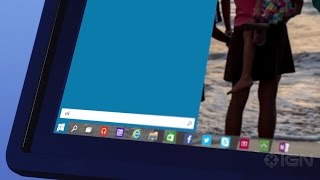
Before upgrading to Windows 10 Pro, make sure your device is up to date and running the most recent version of Windows 10 Home. For more info about how to keep your PC updated, see Windows Update: FAQ.
1. Press the Windows key/logo, go to Settings > Update and Security > Activation.
2. Click the Change product key.

3. Enter your product key, then click the Next button.
4. Click Activate.
If you encounter any errors during the activation process, please check the solutions from our Support Desk. You may also check Microsoft's troubleshooter guide.
Should you require a clean installation, please proceed to How to perform Windows 10 Clean Installation.
Detail
Information
Product type
Windows 10 Home OEM key
Platform
Windows PC
Version support
32-bit and 64-bit
Delivery
Instant download when available
Best for
Clean Windows installation
This Windows 10 Home OEM key is for worldwide use. You can buy it for a Windows PC in supported regions. You should still use the correct Windows 10 Home edition during installation. This key is not for upgrading straight from an older operating system. You need a clean installation instead.
A clean installation can remove old files from your drive. So, save your documents before starting. You should also prepare the official Windows 10 download link. Electronic First provides the key and download instructions after purchase.
Before installing, check these points:
It makes sense if you plan to keep the same motherboard. Once activated, the key stays linked to that computer. This is useful for a fresh build or clean setup. You get the same Windows 10 Home software as other license types. However, it is not ideal if you change PCs often. You also should not buy it for regular transfers.
It depends on your needs. Windows 10 Home OEM is usually cheaper than a retail key. You still get the same Windows 10 Home software. However, a retail key gives more flexibility. You can usually move it to another PC more easily. OEM is better if you want a low-cost key for one PC. Retail is better if you upgrade hardware often.

المستخدم
المستخدم
tahoeminer
المستخدم
المستخدم
15 of 15 reviews loaded


Receive 100% genuine software keys, backed by our Flawless Activation guarantee for complete peace of mind.
Your software key is delivered directly to your email inbox within seconds of completing your purchase. No waiting.
Our dedicated support team is available around the clock via live chat and email to assist with installation and activation.
Our 30-day money-back guarantee ensures a fast refund or replacement if your key is faulty or incompatible.
The price you see is the final price you pay. No hidden service fees or surprise charges at the checkout.
Earn valuable points with every purchase and redeem them for real discounts on future software.
A proven track record with thousands of verified, positive reviews from real customers across the globe.
لماذا يحبنا عملاؤنا
تم تقييمه بشكل ممتاز
Saved a ton on Office 2021. Got my key immediately and it activated without a hitch. EF is the real deal!
by Verified Buyer
Bought a PS Plus membership, code in seconds. Had a minor issue, support resolved it fast. Very impressed!
by Verified Buyer
Doubted a deal this good, but a friend insisted. My Windows 10 Pro key arrived instantly and works perfectly.
by Verified Buyer
Bought Office 2021 at 2am and got my key immediately. I didn’t expect delivery at that hour. Outstanding!
by Verified Buyer
Overseas but still got my code instantly. Xbox Live Gold code redeemed with no region issues. Impressed!
by Verified Buyer
Got Windows 10 Pro & Office 2021 far cheaper than retail. Both keys arrived instantly and activated fine.
by Verified Buyer
Got a Steam game key cheap. Code came instantly, I was playing within minutes of purchase. Can’t beat that!
by Verified Buyer
Bought Windows 11 Pro dirt cheap. Key arrived instantly and activated without issues. Truly 100% legit!
by Verified Buyer
First purchase, was cautious. Fast delivery and legit PS Plus code won me over. I’ll be a repeat buyer.
by Verified Buyer
Bought an Amazon gift card at a discount. Code arrived in seconds and worked perfectly. A lifesaver!
by Verified Buyer
Bought an Xbox Game Pass code at an unbeatable price. Arrived in my email within seconds. Beyond satisfied!
by Verified Buyer
Windows 11 Pro key seemed too cheap. 80k+ reviews convinced me to try them. Code arrived instantly and worked.
by Verified Buyer
انضم لجيشنا للحصول على مميزات الأعضاء الحصرية
سلة المشتريات الخاصة بك فارغة!
Add your favourite games & software to get started.
شاهد أفضل الكتب مبيعاً







Convert coins into real savings at checkout!
Check Dashboard New here? اشترك & Track ProgressEarn EF Coins by completing tasks — build up your balance and turn them into wallet credit!

كن عضوًا في مجتمع إلكترونيك فرست

اشتر منتج

أضف لمسة شخصية لاسمك المستعار

أضف صورة شخصية

قم بإضافة منتج لقائمة التمني الخاصة بك

اطلب منتجًا قبل تاريخ إصداره
اشتر 10 منتجات
اشتر أكثر من 20 منتجًا

عضو لأكثر من 6 أشهر

عضو لأكثر من سنة

اكتب مُراجعة
مشاركة