


Windows error code 0xc004e003 is an error that usually occurs when you try to activate Windows. You may get an error message, “The Software Licensing Service reported that license evaluation failed. This may occur if the license validity interval has expired, or if the license is not signed correctly.
Method 1: System Restore
You might see this error after installing third-party software that changed system files. Windows activation needs certain system files to complete activation. You can try to restore the system files back to an earlier point in time. This removes any software you installed after that point in time without affecting your personal files.
For more info, see the section about how to restore from a system restore point in Recovery options in Windows 10.
Method 2: Activate Windows over the phone
1. Press Windows Key + R to open run
2. Type SLUI 4 and hit enter to open the Windows Activation dialog box

3. Select your country from the drop-down menu and click on Next.
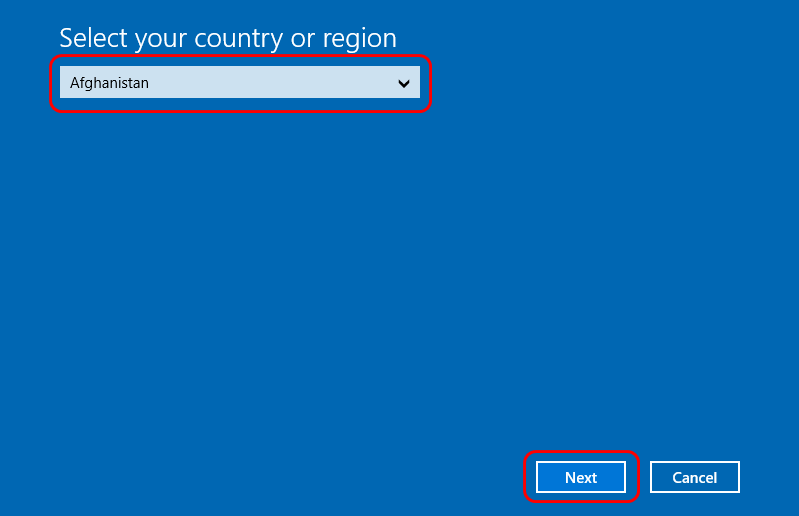
4. Here you will get to see some toll-free phone numbers which you can call.
5. Follow the automated process. You might get lucky and talk to a real person. You will be required to give the mentioned numbers to the other person, who will, in turn, give you a Confirmation ID, which you will need to enter. Once done, click on Activate.
Method 3: Change the product key
1. Press Windows Key + R to open run
2. Type SLUI 3 and hit enter to open the Windows Activation dialog box (This is the shortcut to changing your product key)

3. Type in the product key and click on Activate. You will be required to be connected to the Internet.
Method 4: Rearm Windows then activate
Rearming Windows will clear all stuck and corrupt keys. If the process was stuck halfway, rearming will solve the issue and enable you to activate Windows.
1. Click Start and type: CMD
2. Right-click CMD in the search results and then click Run as administrator
3. At the command prompt, type regedit and hit enter to open the system registry.
4. Go to:
HKEY_LOCAL_MACHINE/Software/Microsoft/Windows/CurrentVersion/setup/OOBE/mediabootinstall

5. Double click on the Changed its value to 0 (if the key doesn’t exist, create it from the edit menu)
6. Go back to the Command Prompt, type the following: slmgr /rearm
7. Restart the PC
8. Use the activate windows link to re-enter the product key. Or Press Windows key + R to open Run, type SLUI 1 and activate your PC.
9. You can also use method 1 and method 2 above to re-enter a product key after rearming.
However, if the above solutions does not work or you do not wish to do the solution above, please contact our Customer Support Team via Support Tickets on your EF Dashboard so we can check if you are eligible for a refund or replacement.
To assist you better, please include the details below:
1. Order ID
2. Screenshot of the pop-up/error message
3. Additional information (if any)

















