
Bewertet
Basiert auf
53,801+
53.8k
Bewertungen
Sofortiger Download
100% Geld-zurück-Garantie
Unterstützung rund um die Uhr
 PlayStation 5
 United States
 Instant Download






Sofortiger Download
100% Geld-zurück-Garantie
MOUSE: P.I. For Hire PS5 US
PlayStation 5
United States
Instant Download
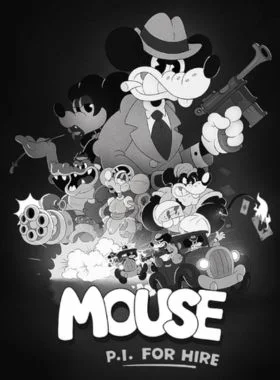
MOUSE: P.I. For Hire is an action-packed first-person shooter that draws inspiration from the classic cartoons of the 1930s. Its black and white rubber hose visuals are drawn by hand, frame by frame, delivering a striking vintage aesthetic. Unravel layers of corruption with a thrilling noir-fueled detective story, lively environments to explore, an original big band jazz soundtrack, and a fully-loaded arsenal of cartoon weapons and devastating power-ups.
DEADLY INVESTIGATIONS
Meet Private Investigator Jack Pepper, a former war hero-turned-detective in a world where danger lurks even in the smallest mouse hole. Uncover the truth when a simple missing persons case quickly escalates into a complex web of intrigue, with corruption, kidnapping and murder all on the docket. Investigate the seedy underbelly of Mouseburg, battle heavily armed gangs and crooked cops, and discover clues to reveal the conspiracy buried underneath the surface.
LOCK, LOAD & LAUGH
From crackling machine guns to explosive firepower, each weapon in Pepper’s arsenal is designed to deploy non-stop cartoon chaos. Arm yourself with an array of classic, creatively twisted and experimental firearms, and consume powerful upgrades when you need that extra spinach-loaded punch! Lethal encounters and manic boss battles await in this boomer shooter-inspired, retro-vibed adventure - and the denizens of Mouseburg never go down without a fight.
A CITY OF SECRETS
Explore a diverse city playground, from dark streets to classic film studios, opulent opera buildings, poisonous swamps and underground sewers. With a myriad of cases to solve and collectibles to find, Mouseburg is truly a detective’s delight! Use every tool at your disposal to wall-run, grapple-hook and double-jump through this unrelenting cartoon world.
FEATURES
- Black and white, hand-drawn rubber hose animation, inspired by cartoons of the 1930s
- Fast-paced FPS combat, where constant movement is key
- A thrilling single-player campaign that unravels a complex web of crime and corruption
- Over 20 noir-infused levels, teeming with mice, rats and shrews
- Fully-loaded arsenal of over a dozen unique weapons and equipment - with a cartoon twist
- Devastating consumable power-ups, capable of turning the tide of any battle
- Unlockable movement abilities and Metroidvania-inspired level traversal
- Original jazz soundtrack, featuring a big band orchestral ensemble

PS4-Konsole:
1. Gehe zum PlayStation Store

2. Scrollen Sie zum Ende der Seitenleiste und wählen Sie „Codes einlösen“

3. Geben Sie den 12-stelligen Code sorgfältig ein, drücken Sie dann auf „Fertig“ und folgen Sie den Schritten zum Einlösen Ihres Codes.

4. Herzlichen Glückwunsch! Das Guthaben bzw. der Inhalt wird nun Ihrem Konto gutgeschrieben.
HINWEIS: Bei PSN-Spielen können Sie wählen, ob Sie sie sofort oder zu einem beliebigen Zeitpunkt herunterladen möchten. Gehen Sie dazu einfach zu Bibliothek und dann zu Gekauft.
PS5-Konsole:
4. Wählen Sie „Code einlösen“.
5. Geben Sie Ihren 12-stelligen Code ein und lösen Sie ihn ein.
6. Herzlichen Glückwunsch! Das Guthaben bzw. der Inhalt wird nun Ihrem Konto gutgeschrieben.
Webbrowser
1. Rufen Sie die Website des PlayStation Store auf und melden Sie sich bei Ihrem PSN-Konto an.
2. Klicken Sie oben rechts auf dem Bildschirm auf Ihren Avatar.
3. Wählen Sie „Codes einlösen“ aus dem Dropdown-Menü.
4. Geben Sie den 12-stelligen Code sorgfältig ein und klicken Sie dann auf „Weiter“.
5. Bestätigen Sie das Produkt, indem Sie auf „Guthaben hinzufügen/Einlösen/Bestätigen“ klicken.
6. Herzlichen Glückwunsch! Das Guthaben bzw. der Inhalt wird nun Ihrem Konto gutgeschrieben.
ERINNERUNGEN:
Beim Einlösen von PSN-Codes müssen keine Großbuchstaben, Leerzeichen oder Bindestriche hinzugefügt werden.
Wenn der Kauf nicht angezeigt wird, versuchen Sie Folgendes:
1. Einlösen über die Konsole > Starten Sie Ihre Konsole neu.
2. Einlösen über den Webbrowser > Melden Sie sich von der Kontoverwaltung ab oder verlassen Sie den PlayStation Store und melden Sie sich erneut an, um Ihr Konto zu aktualisieren.
3. Besuchen Sie die PlayStation Network-Statusseite. Bitte warten Sie, bis die Lichter grün sind, bevor Sie versuchen, den Code einzugeben.
4. Wenn Ihr Code als verwendet oder ungültig zurückgegeben wird, folgen Sie bitte den Anweisungen in diesem Artikel.
Haben Sie immer noch Probleme beim Einlösen Ihres Codes? Sehen Sie sich die Anleitung zum Beheben häufiger Fehler für PlayStation an.Seien Sie der Erste, der dieses Produkt bewertet!



Receive 100% genuine software keys, backed by our Flawless Activation guarantee for complete peace of mind.
Your software key is delivered directly to your email inbox within seconds of completing your purchase. No waiting.
Our dedicated support team is available around the clock via live chat and email to assist with installation and activation.
Our 30-day money-back guarantee ensures a fast refund or replacement if your key is faulty or incompatible.
The price you see is the final price you pay. No hidden service fees or surprise charges at the checkout.
Earn valuable points with every purchase and redeem them for real discounts on future software.
A proven track record with thousands of verified, positive reviews from real customers across the globe.
Schneller Mover
97+ Verkauft

Schneller Mover
80+ Verkauft

Warum unsere Kunden uns lieben
Als ausgezeichnet bewertet
Saved a ton on Office 2021. Got my key immediately and it activated without a hitch. EF is the real deal!
by Verified Buyer
Bought a PS Plus membership, code in seconds. Had a minor issue, support resolved it fast. Very impressed!
by Verified Buyer
Doubted a deal this good, but a friend insisted. My Windows 10 Pro key arrived instantly and works perfectly.
by Verified Buyer
Bought Office 2021 at 2am and got my key immediately. I didn’t expect delivery at that hour. Outstanding!
by Verified Buyer
Overseas but still got my code instantly. Xbox Live Gold code redeemed with no region issues. Impressed!
by Verified Buyer
Got Windows 10 Pro & Office 2021 far cheaper than retail. Both keys arrived instantly and activated fine.
by Verified Buyer
Got a Steam game key cheap. Code came instantly, I was playing within minutes of purchase. Can’t beat that!
by Verified Buyer
Bought Windows 11 Pro dirt cheap. Key arrived instantly and activated without issues. Truly 100% legit!
by Verified Buyer
First purchase, was cautious. Fast delivery and legit PS Plus code won me over. I’ll be a repeat buyer.
by Verified Buyer
Bought an Amazon gift card at a discount. Code arrived in seconds and worked perfectly. A lifesaver!
by Verified Buyer
Bought an Xbox Game Pass code at an unbeatable price. Arrived in my email within seconds. Beyond satisfied!
by Verified Buyer
Windows 11 Pro key seemed too cheap. 80k+ reviews convinced me to try them. Code arrived instantly and worked.
by Verified Buyer
Verdienen Sie zusätzliche, mühelose Einnahmen,
indem Sie unserem Affiliate-Programm beitreten
Treten Sie der EF Army bei und profitieren Sie von exklusiven Mitgliedervorteilen


Convert coins into real savings at checkout!
Check Dashboard New here? Melde dich an & Track ProgressEarn EF Coins by completing tasks — build up your balance and turn them into wallet credit!

Sei ein Mitglied der EF-Community

Ein Produkt kaufen

Personalisiere deinen Spitznamen

Profilbild hinzufügen

Produkt zur Wunschliste hinzufügen

Ein Produkt vorbestellen

10 Produkte kaufen

20 Produkte kaufen

Mitglied seit mehr als 6 Monaten

Mitglied seit mehr als einem Jahr

Hinterlassen Sie eine Bewertung
Every 10,000 EF Coins = $1 Credit


Teilen