
Bewertet
Basiert auf
53,801+
53.8k
Bewertungen
Sofortiger Download
100% Geld-zurück-Garantie
Unterstützung rund um die Uhr
 PlayStation 5
 United States
 Instant Download
Sofortiger Download
100% Geld-zurück-Garantie
Unterstützung rund um die Uhr
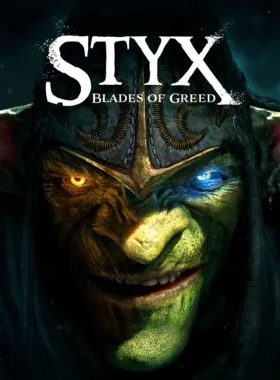
Styx: Blades of Greed PS5 US
PlayStation 5
United States
Instant Download
Please Note - You will be sent gift cards equal to or above the market value of this product to add to your wallet on the PlayStation Store.
Just Redeem the codes and purchase 'Styx: Blades of Greed PS5 US' directly from the PlayStation store.
Pre-order Styx: Blades of Greed and receive the Master of Shadows Skin, Styx’s iconic outfit in the first game of the series.
You play as Styx, a cunning goblin with a caustic sense of humor who has mastered the art of stealth. Your goal is to get your hands on Quartz, the most precious – and dangerous – resource in a world on the brink of war between elves, humans and orcs.
Styx: Blades of Greed refines the proven formula of the first two games by making freedom and creativity central to the experience. Explore vast vertical environments and master new tools and powers. Whether you're discovering Styx for the first time or you're a longtime fan, it has never been so exciting to be greedy!
FROM PAWN TO BOSS – QUITE THE RISE IN STATURE!
No more working for others! This time, our famous green-skinned friend is pursuing his own goal and leading his own crew. Aboard his zeppelin, Styx and his crew hunt down a new, mysterious power source: Quartz. Throughout your mischievous journey, you'll encounter familiar faces and colorful new characters while outwitting the Inquisition's traps. This adventure marks the beginning of the Great War and the creation of the Black Hand, the mercenary group central to the events of Of Orcs and Men.
INFILTRATION IS AN ART AND THE DAGGER IS THE BRUSH
Every great heist requires preparation! Craft weapons and potions before executing your next scheme. A wide range of abilities is at your disposal: Cloning and Invisibility return thanks to your Amber skills. Master Mind Control and Time Shift abilities granted by Quartz. Every situation is a stealth puzzle you can solve in multiple ways. Despite his small size, Styx relies on agility, sharp wit and biting humor to escape the trickiest situations.
Always reaching for the dagger first? Who are we to judge… No harm seen, no harm done!
A FANTASY WORLD AWAITS, IF YOU FLY PAST THE LAW
Roam freely around three vast open environments: The Wall, which marks the boundary of the human world; the lush orc village of Turquoise Dawn; and the Ruins of the elven capital, Akenash. Soar through the skies with your glider, reach inaccessible spots in a flash with your grapple, and scale massive walls with your claws. Take advantage of the vertical environments to reach your targets. Every new tool unlocks previously unreachable areas with Metroidvania-style progression.

PS4-Konsole:
1. Gehe zum PlayStation Store

2. Scrollen Sie zum Ende der Seitenleiste und wählen Sie „Codes einlösen“

3. Geben Sie den 12-stelligen Code sorgfältig ein, drücken Sie dann auf „Fertig“ und folgen Sie den Schritten zum Einlösen Ihres Codes.

4. Herzlichen Glückwunsch! Das Guthaben bzw. der Inhalt wird nun Ihrem Konto gutgeschrieben.
HINWEIS: Bei PSN-Spielen können Sie wählen, ob Sie sie sofort oder zu einem beliebigen Zeitpunkt herunterladen möchten. Gehen Sie dazu einfach zu Bibliothek und dann zu Gekauft.
PS5-Konsole:
4. Wählen Sie „Code einlösen“.
5. Geben Sie Ihren 12-stelligen Code ein und lösen Sie ihn ein.
6. Herzlichen Glückwunsch! Das Guthaben bzw. der Inhalt wird nun Ihrem Konto gutgeschrieben.
Webbrowser
1. Rufen Sie die Website des PlayStation Store auf und melden Sie sich bei Ihrem PSN-Konto an.
2. Klicken Sie oben rechts auf dem Bildschirm auf Ihren Avatar.
3. Wählen Sie „Codes einlösen“ aus dem Dropdown-Menü.
4. Geben Sie den 12-stelligen Code sorgfältig ein und klicken Sie dann auf „Weiter“.
5. Bestätigen Sie das Produkt, indem Sie auf „Guthaben hinzufügen/Einlösen/Bestätigen“ klicken.
6. Herzlichen Glückwunsch! Das Guthaben bzw. der Inhalt wird nun Ihrem Konto gutgeschrieben.
ERINNERUNGEN:
Beim Einlösen von PSN-Codes müssen keine Großbuchstaben, Leerzeichen oder Bindestriche hinzugefügt werden.
Wenn der Kauf nicht angezeigt wird, versuchen Sie Folgendes:
1. Einlösen über die Konsole > Starten Sie Ihre Konsole neu.
2. Einlösen über den Webbrowser > Melden Sie sich von der Kontoverwaltung ab oder verlassen Sie den PlayStation Store und melden Sie sich erneut an, um Ihr Konto zu aktualisieren.
3. Besuchen Sie die PlayStation Network-Statusseite. Bitte warten Sie, bis die Lichter grün sind, bevor Sie versuchen, den Code einzugeben.
4. Wenn Ihr Code als verwendet oder ungültig zurückgegeben wird, folgen Sie bitte den Anweisungen in diesem Artikel.
Haben Sie immer noch Probleme beim Einlösen Ihres Codes? Sehen Sie sich die Anleitung zum Beheben häufiger Fehler für PlayStation an.Seien Sie der Erste, der dieses Produkt bewertet!



Receive 100% genuine software keys, backed by our Flawless Activation guarantee for complete peace of mind.
Your software key is delivered directly to your email inbox within seconds of completing your purchase. No waiting.
Our dedicated support team is available around the clock via live chat and email to assist with installation and activation.
Our 30-day money-back guarantee ensures a fast refund or replacement if your key is faulty or incompatible.
The price you see is the final price you pay. No hidden service fees or surprise charges at the checkout.
Earn valuable points with every purchase and redeem them for real discounts on future software.
A proven track record with thousands of verified, positive reviews from real customers across the globe.

Schneller Mover
96+ Verkauft

Schneller Mover
77+ Verkauft

Warum unsere Kunden uns lieben
Als ausgezeichnet bewertet
Saved a ton on Office 2021. Got my key immediately and it activated without a hitch. EF is the real deal!
by Verified Buyer
Bought a PS Plus membership, code in seconds. Had a minor issue, support resolved it fast. Very impressed!
by Verified Buyer
Doubted a deal this good, but a friend insisted. My Windows 10 Pro key arrived instantly and works perfectly.
by Verified Buyer
Bought Office 2021 at 2am and got my key immediately. I didn’t expect delivery at that hour. Outstanding!
by Verified Buyer
Overseas but still got my code instantly. Xbox Live Gold code redeemed with no region issues. Impressed!
by Verified Buyer
Got Windows 10 Pro & Office 2021 far cheaper than retail. Both keys arrived instantly and activated fine.
by Verified Buyer
Got a Steam game key cheap. Code came instantly, I was playing within minutes of purchase. Can’t beat that!
by Verified Buyer
Bought Windows 11 Pro dirt cheap. Key arrived instantly and activated without issues. Truly 100% legit!
by Verified Buyer
First purchase, was cautious. Fast delivery and legit PS Plus code won me over. I’ll be a repeat buyer.
by Verified Buyer
Bought an Amazon gift card at a discount. Code arrived in seconds and worked perfectly. A lifesaver!
by Verified Buyer
Bought an Xbox Game Pass code at an unbeatable price. Arrived in my email within seconds. Beyond satisfied!
by Verified Buyer
Windows 11 Pro key seemed too cheap. 80k+ reviews convinced me to try them. Code arrived instantly and worked.
by Verified Buyer
Verdienen Sie zusätzliche, mühelose Einnahmen,
indem Sie unserem Affiliate-Programm beitreten
Treten Sie der EF Army bei und profitieren Sie von exklusiven Mitgliedervorteilen






Convert coins into real savings at checkout!
Check Dashboard New here? Melde dich an & Track ProgressEarn EF Coins by completing tasks — build up your balance and turn them into wallet credit!

Sei ein Mitglied der EF-Community

Ein Produkt kaufen

Personalisiere deinen Spitznamen

Profilbild hinzufügen

Produkt zur Wunschliste hinzufügen

Ein Produkt vorbestellen

10 Produkte kaufen

20 Produkte kaufen

Mitglied seit mehr als 6 Monaten

Mitglied seit mehr als einem Jahr

Hinterlassen Sie eine Bewertung
Every 10,000 EF Coins = $1 Credit


Teilen