
Classé
Basé sur
53,801+
53.8k
avis
Téléchargement instantané
Garantie de remboursement à 100 %
Assistance 24 heures sur 24
 PS5 PLAYSTATION 5
 ROYAUME-UNI
 Instant Download






Téléchargement instantané
Garantie de remboursement à 100 %
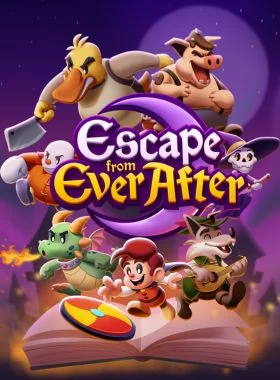
Escape from Ever After PS5 UK
PS5 PLAYSTATION 5
ROYAUME-UNI
Instant Download
Please Note - You will be sent gift cards equal to or above the market value of this product to add to your wallet on the PlayStation Store.
Just Redeem the codes and purchase 'Escape from Ever After PS5 UK' directly from the PlayStation store.
Escape from Ever After is an adventure RPG where fairytale and storybook characters must fight back against capitalism!
Story
When Flynt Buckler, a classic fairytale adventurer, storms the castle of his evil dragon arch-nemesis Tinder, he finds the once intimidating fortress has been converted into… corporate offices? The villainous dragon is nowhere to be found and her castle is full of mindless coffee-sipping, report-filing drones. What happened?
It turns out that storybooks are an untapped market ripe with valuable resources, cheap labor, and profit to be had—so naturally, real-world conglomerate Ever After Inc.™ found a way to intervene! With Tinder’s Castle as their new corporate headquarters, Ever After Inc. is hellbent on taking over every storybook they can. With no choice but to get a job, Flynt Buckler must team up with his former nemesis Tinder in order to climb the corporate ladder and take down Ever After Inc. from the inside!
Explore
Dive into storybook worlds packed to the brim with colorful characters, captivating locales, and electrifying secrets! One moment you’ll be fleeing Lovecraftian terrors while solving a noir murder mystery, and the next you’ll be up against villainous versions of The Three Little Pigs as they try to bulldoze a fairytale forest for their real estate developments. The rules are always changing!
Fight
Face off against hordes of wacky enemies in snappy turn-based gameplay! Perfectly-timed action commands allow Flynt to finish off his foes with style, and an assortment of items, badges, and partners ensure there’s always a trick up his sleeve.
Features
-Fight in a fun, fast-paced battle system that rewards experimentation and strategy
-Build and customize your party—every character has unique skills that can be equipped and upgraded throughout your journey
-Engage in office banter, help your storybook coworkers, and decorate your office as you climb the corporate ladder
-Explore vast storybook worlds brimming with sidequests, treasures, and secrets
-Stories within stories: experience a charming and lively narrative where the rules are constantly changing
-A jazzy, big-band soundtrack that keeps the energy pumping throughout
1. Accédez au PlayStation Store.

2. Faites défiler la page vers le bas de la barre latérale, puis sélectionnez Utiliser les codes
.
3. Entrez soigneusement le code à 12 chiffres, puis appuyez sur OK et suivez les étapes pour utiliser votre code
.
4. Félicitations ! Le crédit ou le contenu est désormais appliqué à votre compte.
REMARQUE : pour les jeux PSN, vous pouvez choisir de les télécharger immédiatement ou à tout moment. Il vous suffit d'accéder à la bibliothèque, puis à la section Achats.
1. Accédez au PlayStation Store.
2. Appuyez sur le D-Pad pour afficher les différents onglets, à savoir Dernières actualités, Collections, Abonnements, Parcourir
.3. Cliquez sur le bouton à trois points en haut à droite de l'écran
.4. Sélectionnez Utiliser le code
.5. Entrez votre code à 12 chiffres et utilisez-le.
6. Félicitations ! Le crédit ou le contenu est désormais appliqué à votre compte.
1. Accédez au site Web du PlayStation Store et connectez-vous à votre compte PSN.
2. Cliquez sur votre avatar en haut à droite de l'écran.
3. Sélectionnez Utiliser les codes dans le menu déroulant.

4. Entrez soigneusement le code à 12 chiffres, puis cliquez sur Suivant
.5. Confirmez le produit en cliquant sur Ajouter des fonds/Utiliser/Confirmer
.6. Félicitations ! Le crédit ou le contenu est désormais appliqué à votre compte.
Lorsque vous utilisez des codes PSN, il n'est pas nécessaire d'ajouter des majuscules, des espaces ou des tirets.
Si l'achat n'est pas reflété, veuillez essayer ce qui suit :
1. Utilisation via la console > Redémarrez votre console
2. Utilisation via un navigateur Web > Déconnectez-vous de la page Gestion du compte ou quittez le PlayStation Store et reconnectez-vous pour actualiser votre
compte.3. Consultez la page d'état du PlayStation Network. Veuillez attendre que les voyants soient verts avant d'essayer de saisir le code.
4. Si votre code revient comme étant utilisé ou non valide, veuillez suivre les instructions de cet article.
Vous neparvenez toujours pas à utiliser votre code ? Consultez la section Corriger les erreurs courantes pour PlayStation.
Soyez le premier à donner votre avis sur ce produit !



Receive 100% genuine software keys, backed by our Flawless Activation guarantee for complete peace of mind.
Your software key is delivered directly to your email inbox within seconds of completing your purchase. No waiting.
Our dedicated support team is available around the clock via live chat and email to assist with installation and activation.
Our 30-day money-back guarantee ensures a fast refund or replacement if your key is faulty or incompatible.
The price you see is the final price you pay. No hidden service fees or surprise charges at the checkout.
Earn valuable points with every purchase and redeem them for real discounts on future software.
A proven track record with thousands of verified, positive reviews from real customers across the globe.


Pourquoi nos clients nous aiment
Classé « Excellent »
Saved a ton on Office 2021. Got my key immediately and it activated without a hitch. EF is the real deal!
by Verified Buyer
Bought a PS Plus membership, code in seconds. Had a minor issue, support resolved it fast. Very impressed!
by Verified Buyer
Doubted a deal this good, but a friend insisted. My Windows 10 Pro key arrived instantly and works perfectly.
by Verified Buyer
Bought Office 2021 at 2am and got my key immediately. I didn’t expect delivery at that hour. Outstanding!
by Verified Buyer
Overseas but still got my code instantly. Xbox Live Gold code redeemed with no region issues. Impressed!
by Verified Buyer
Got Windows 10 Pro & Office 2021 far cheaper than retail. Both keys arrived instantly and activated fine.
by Verified Buyer
Got a Steam game key cheap. Code came instantly, I was playing within minutes of purchase. Can’t beat that!
by Verified Buyer
Bought Windows 11 Pro dirt cheap. Key arrived instantly and activated without issues. Truly 100% legit!
by Verified Buyer
First purchase, was cautious. Fast delivery and legit PS Plus code won me over. I’ll be a repeat buyer.
by Verified Buyer
Bought an Amazon gift card at a discount. Code arrived in seconds and worked perfectly. A lifesaver!
by Verified Buyer
Bought an Xbox Game Pass code at an unbeatable price. Arrived in my email within seconds. Beyond satisfied!
by Verified Buyer
Windows 11 Pro key seemed too cheap. 80k+ reviews convinced me to try them. Code arrived instantly and worked.
by Verified Buyer
Gagnez des revenus supplémentaires sans effort
en rejoignant notre programme d'affiliation
Rejoignez l'EF Army pour bénéficier d'avantages exclusifs pour les membres
Votre panier est vide !
Add your favourite games & software to get started.
Voir les meilleures ventes


Convert coins into real savings at checkout!
Check Dashboard New here? INSCRIVEZ-VOUS & Track ProgressEarn EF Coins by completing tasks — build up your balance and turn them into wallet credit!

Devenez membre de la communauté EF

Acheter un produit

Personnalisez votre surnom

Ajouter une photo de profil

Ajouter un produit à la liste de souhaits

Précommandez un produit

Achetez 10 produits

Achetez 20 produits

Membre depuis plus de 6 mois

Membre depuis plus d'un an

Laisser un commentaire
Every 10,000 EF Coins = $1 Credit


PARTAGEZ