
Valutato
Basato su
53,801+
53.8k
Recensioni
Download immediato
Garanzia di rimborso al 100%
Supporto 24 ore su 24, 7 giorni su 7
 PS5 PLAYSTATION 5
 Regno Unito
 Instant Download






Download immediato
Garanzia di rimborso al 100%
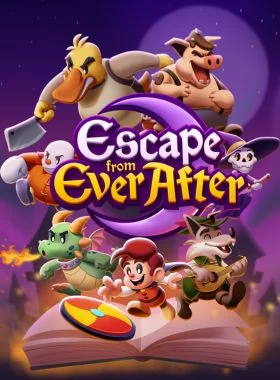
Escape from Ever After PS5 UK
PS5 PLAYSTATION 5
Regno Unito
Instant Download
Please Note - You will be sent gift cards equal to or above the market value of this product to add to your wallet on the PlayStation Store.
Just Redeem the codes and purchase 'Escape from Ever After PS5 UK' directly from the PlayStation store.
Escape from Ever After is an adventure RPG where fairytale and storybook characters must fight back against capitalism!
Story
When Flynt Buckler, a classic fairytale adventurer, storms the castle of his evil dragon arch-nemesis Tinder, he finds the once intimidating fortress has been converted into… corporate offices? The villainous dragon is nowhere to be found and her castle is full of mindless coffee-sipping, report-filing drones. What happened?
It turns out that storybooks are an untapped market ripe with valuable resources, cheap labor, and profit to be had—so naturally, real-world conglomerate Ever After Inc.™ found a way to intervene! With Tinder’s Castle as their new corporate headquarters, Ever After Inc. is hellbent on taking over every storybook they can. With no choice but to get a job, Flynt Buckler must team up with his former nemesis Tinder in order to climb the corporate ladder and take down Ever After Inc. from the inside!
Explore
Dive into storybook worlds packed to the brim with colorful characters, captivating locales, and electrifying secrets! One moment you’ll be fleeing Lovecraftian terrors while solving a noir murder mystery, and the next you’ll be up against villainous versions of The Three Little Pigs as they try to bulldoze a fairytale forest for their real estate developments. The rules are always changing!
Fight
Face off against hordes of wacky enemies in snappy turn-based gameplay! Perfectly-timed action commands allow Flynt to finish off his foes with style, and an assortment of items, badges, and partners ensure there’s always a trick up his sleeve.
Features
-Fight in a fun, fast-paced battle system that rewards experimentation and strategy
-Build and customize your party—every character has unique skills that can be equipped and upgraded throughout your journey
-Engage in office banter, help your storybook coworkers, and decorate your office as you climb the corporate ladder
-Explore vast storybook worlds brimming with sidequests, treasures, and secrets
-Stories within stories: experience a charming and lively narrative where the rules are constantly changing
-A jazzy, big-band soundtrack that keeps the energy pumping throughout
Console PS4:
1. Vai su PlayStation Store

2. Scorri fino in fondo alla barra laterale, seleziona Riscatta codici

3. Inserisci con attenzione il codice a 12 cifre, quindi premi Fatto e segui i passaggi per riscattare il codice.

4. Congratulazioni! Il credito o il contenuto è ora applicato al tuo account.
NOTA: Per i giochi PSN, puoi scegliere di scaricarli subito o in qualsiasi momento, vai su Libreria, quindi Acquistati.
Console PS5:
4. Seleziona Riscatta codice.
5. Inserisci il tuo codice di 12 cifre e Riscattalo.
6. Congratulazioni! Il credito o il contenuto è ora applicato al tuo account.
Browser Web
1. Vai al sito Web PlayStation Store e accedi al tuo account PSN.
2. Fai clic sul tuo avatar in alto a destra dello schermo.
3. Seleziona Riscatta codici dal menu a discesa.
4. Inserisci con attenzione il codice di 12 cifre, quindi premi Avanti.
5. Conferma il prodotto cliccando su Aggiungi fondi/Riscatta/Conferma
6. Congratulazioni! Il credito o il contenuto è ora applicato al tuo account.
PROMEMORIA:
Quando riscatti codici PSN, non è necessario aggiungere lettere maiuscole, spazi vuoti o trattini.
Se l'acquisto non viene visualizzato, prova quanto segue:
1. Riscatta tramite console > Riavvia la console
2. Riscatta tramite browser web > Esci da Gestione account o esci dal PlayStation Store e accedi di nuovo per aggiornare il tuo account.
3. Visita la pagina Stato PlayStation Network. Attendi che le luci diventino verdi prima di provare a inserire il codice.
4. Se il tuo codice risulta utilizzato o non valido, segui le istruzioni di questo articolo.
Hai ancora problemi a riscattare il tuo codice? Dai un'occhiata a Correggi errori comuni per PlayStation.Sii il primo a recensire questo prodotto!



Receive 100% genuine software keys, backed by our Flawless Activation guarantee for complete peace of mind.
Your software key is delivered directly to your email inbox within seconds of completing your purchase. No waiting.
Our dedicated support team is available around the clock via live chat and email to assist with installation and activation.
Our 30-day money-back guarantee ensures a fast refund or replacement if your key is faulty or incompatible.
The price you see is the final price you pay. No hidden service fees or surprise charges at the checkout.
Earn valuable points with every purchase and redeem them for real discounts on future software.
A proven track record with thousands of verified, positive reviews from real customers across the globe.


Perché i nostri clienti ci amano
Valutato come eccellente
Saved a ton on Office 2021. Got my key immediately and it activated without a hitch. EF is the real deal!
by Verified Buyer
Bought a PS Plus membership, code in seconds. Had a minor issue, support resolved it fast. Very impressed!
by Verified Buyer
Doubted a deal this good, but a friend insisted. My Windows 10 Pro key arrived instantly and works perfectly.
by Verified Buyer
Bought Office 2021 at 2am and got my key immediately. I didn’t expect delivery at that hour. Outstanding!
by Verified Buyer
Overseas but still got my code instantly. Xbox Live Gold code redeemed with no region issues. Impressed!
by Verified Buyer
Got Windows 10 Pro & Office 2021 far cheaper than retail. Both keys arrived instantly and activated fine.
by Verified Buyer
Got a Steam game key cheap. Code came instantly, I was playing within minutes of purchase. Can’t beat that!
by Verified Buyer
Bought Windows 11 Pro dirt cheap. Key arrived instantly and activated without issues. Truly 100% legit!
by Verified Buyer
First purchase, was cautious. Fast delivery and legit PS Plus code won me over. I’ll be a repeat buyer.
by Verified Buyer
Bought an Amazon gift card at a discount. Code arrived in seconds and worked perfectly. A lifesaver!
by Verified Buyer
Bought an Xbox Game Pass code at an unbeatable price. Arrived in my email within seconds. Beyond satisfied!
by Verified Buyer
Windows 11 Pro key seemed too cheap. 80k+ reviews convinced me to try them. Code arrived instantly and worked.
by Verified Buyer
Guadagna un reddito extra e senza sforzo
unendoti al nostro Programma di affiliazione
Unisciti all'Esercito EF per ottenere vantaggi esclusivi per i membri


Convert coins into real savings at checkout!
Check Dashboard New here? Iscrizione & Track ProgressEarn EF Coins by completing tasks — build up your balance and turn them into wallet credit!

Diventa membro della comunità EF

Acquista un prodotto

Personalizza il tuo soprannome

Aggiungi immagine del profilo

Aggiungi un prodotto alla lista dei desideri

Preordina un prodotto

Acquista 10 prodotti

Acquista 20 prodotti

Membro da più di 6 mesi

Membro da più di un anno

Lascia una recensione
Every 10,000 EF Coins = $1 Credit


Condividere