
حاصل على تقييم
بُناءً على
53,801+
53.8k
مراجعة
تنزيل فوري
ضمان استرداد الأموال بنسبة 100%
دعم فني 24/7
 بلايستيشن 5 بلاي ستيشن 5
 United States
 Instant Download
تنزيل فوري
ضمان استرداد الأموال بنسبة 100%
دعم فني 24/7
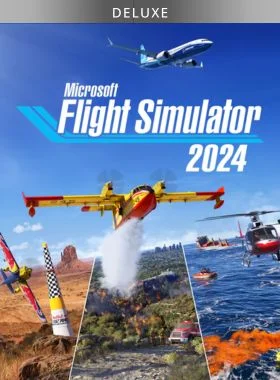
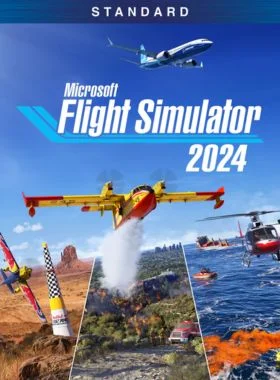
Microsoft Flight Simulator 2024 - Deluxe Edition PS5 US
بلايستيشن 5 بلاي ستيشن 5
United States
Instant Download
Please Note - You will be sent gift cards equal to or above the market value of this product to add to your wallet on the PlayStation Store.
Just Redeem the codes and purchase 'Microsoft Flight Simulator 2024 - Deluxe Edition PS5 US' directly from the PlayStation store.
Deluxe Edition
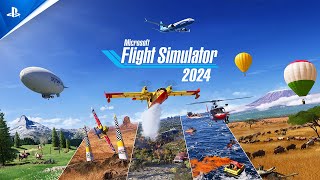
Explore the world with our largest fleet of aircraft and take simulation to new heights while pursuing your aviation career within Microsoft Flight Simulator 2024. The Deluxe Edition includes everything from the Standard Edition plus 10 additional aircraft and 5 additional handcrafted international airports.
Fly with Purpose
· Launch your aviation Career wherever you choose in the world. Gain experience, build your reputation, and complete certifications to gain access to authentic aviation activities ranging from Medevac, Remote Cargo Ops, Aerial Firefighting, Search & Rescue and more, all the way to becoming an Airline Passenger Transport Pilot.
· Compete against other pilots in the all-new Challenge League mode or hone your skills in dozens of Activities ranging from exciting Rally Races and Precision Landings to Low-Altitude challenges and more.
· Be a World Photographer and travel across our beautiful planet to capture awe-inspiring natural vistas, visit famous landmarks, and record these adventures with pictures in your travel book.
Advanced Simulation
· Enhanced physics system allows 10,000+ rigid-body surfaces that enable the simulation of any shape of aircraft. Soft body physics supports cloth, ropes, balloons, and more. Improved ground and water handling further enhance realism.
· New, highly accurate aircraft systems including electrical, pneumatic, fuel and hydraulic systems, payload and passenger systems, and avionics like the Universal UNS-1 FMS and Honeywell Primus Epic 2. Preflight inspections and walkaround checks add to immersion.
· Plan your flights with a groundbreaking flight planner which supports both IFR and VFR map layers, IFR charts, route planning, fuel and payload planning, vertical profile planning, and ETOPS planning.
Explore Our Visually Stunning Digital Twin
· Explore our most detailed re-creation of planet Earth to date. Enhanced digital elevation maps, over 500 TIN (triangular irregular network) cities and more than 100,000 square kilometers of countryside photogrammetry allow for visually stunning digital twin experiences. More than 150 airports, 2,000 glider airports, 10,000 heliports, 2,000 points of interest, and 900 oil rigs have been carefully hand-crafted while a procedural system generates all 40,000 airports, 80,000 helipads, 1.5 billion buildings, and nearly 3 trillion trees on our planet.
· Land anywhere and, for the first time in Microsoft Flight Simulator, exit your aircraft to explore highly detailed biomes with hundreds of species of vegetation, dynamically created details including grass, rocks, and flowers – all influenced by seasonal changes.
· The world comes alive with a vast array of land-based wildlife. Oceans and waterways are teeming with live, worldwide maritime traffic ranging from large tankers and cargo ships to trawlers, tugs, and more. Enhanced real-world air traffic populates the skies and airport tarmacs with hundreds of accurately depicted aircraft models and dozens of officially licensed liveries.
اذهب إلى متجر بلاي ستيشن

قم بالتمرير إلى أسفل الشريط الجانبي، وحدد استرداد الرموز

أدخل الرمز المكون من 12 رقمًا بعناية، ثم اضغط على "تم" واتبع الخطوات لاسترداد الرمز الخاص بك.

ملاحظة: بالنسبة لألعاب PSN، يمكنك اختيار التنزيل على الفور أو في أي وقت، فقط انتقل إلى المكتبة، ثم تم شراؤها.
اذهب إلى متجر بلاي ستيشن
قم بالتمرير إلى أسفل الشريط الجانبي، وحدد استرداد الرموز
انتقل إلى زر النقاط الثلاث الموجود في الزاوية اليمنى العليا من الشاشة
اختر "استرداد الرمز"
ادخل الكود الخاص بك المُكون من 12 عشر رقمًا / حرفًا.
تهانينا! يتم الآن تطبيق الرصيد أو المحتوى على حسابك.
انتقل إلى موقع متجر البلاي ستيشن وقم بتسجيل الدخول إلى حساب PSN الخاص بك.
انقر على الصورة الرمزية الخاصة بك في الجزء العلوي الأيمن من الشاشة.
حدد استرداد الرموز من القائمة المنسدلة.

أدخل الرمز المكون من 12 رقمًا بعناية، ثم اضغط على التالي.
قم بتأكيد المنتج بالنقر فوق إضافة أموال/استرداد/تأكيد
تهانينا! تم الآن إضافة الرصيد أو المحتوى على حسابك.
كن أول من يُقيّم هذا المنتج!


Receive 100% genuine software keys, backed by our Flawless Activation guarantee for complete peace of mind.
Your software key is delivered directly to your email inbox within seconds of completing your purchase. No waiting.
Our dedicated support team is available around the clock via live chat and email to assist with installation and activation.
Our 30-day money-back guarantee ensures a fast refund or replacement if your key is faulty or incompatible.
The price you see is the final price you pay. No hidden service fees or surprise charges at the checkout.
Earn valuable points with every purchase and redeem them for real discounts on future software.
A proven track record with thousands of verified, positive reviews from real customers across the globe.


لماذا يحبنا عملاؤنا
تم تقييمه بشكل ممتاز
Saved a ton on Office 2021. Got my key immediately and it activated without a hitch. EF is the real deal!
by Verified Buyer
Bought a PS Plus membership, code in seconds. Had a minor issue, support resolved it fast. Very impressed!
by Verified Buyer
Doubted a deal this good, but a friend insisted. My Windows 10 Pro key arrived instantly and works perfectly.
by Verified Buyer
Bought Office 2021 at 2am and got my key immediately. I didn’t expect delivery at that hour. Outstanding!
by Verified Buyer
Overseas but still got my code instantly. Xbox Live Gold code redeemed with no region issues. Impressed!
by Verified Buyer
Got Windows 10 Pro & Office 2021 far cheaper than retail. Both keys arrived instantly and activated fine.
by Verified Buyer
Got a Steam game key cheap. Code came instantly, I was playing within minutes of purchase. Can’t beat that!
by Verified Buyer
Bought Windows 11 Pro dirt cheap. Key arrived instantly and activated without issues. Truly 100% legit!
by Verified Buyer
First purchase, was cautious. Fast delivery and legit PS Plus code won me over. I’ll be a repeat buyer.
by Verified Buyer
Bought an Amazon gift card at a discount. Code arrived in seconds and worked perfectly. A lifesaver!
by Verified Buyer
Bought an Xbox Game Pass code at an unbeatable price. Arrived in my email within seconds. Beyond satisfied!
by Verified Buyer
Windows 11 Pro key seemed too cheap. 80k+ reviews convinced me to try them. Code arrived instantly and worked.
by Verified Buyer
انضم لجيشنا للحصول على مميزات الأعضاء الحصرية
سلة المشتريات الخاصة بك فارغة!
Add your favourite games & software to get started.
شاهد أفضل الكتب مبيعاً






Convert coins into real savings at checkout!
Check Dashboard New here? اشترك & Track ProgressEarn EF Coins by completing tasks — build up your balance and turn them into wallet credit!

كن عضوًا في مجتمع إلكترونيك فرست

اشتر منتج

أضف لمسة شخصية لاسمك المستعار

أضف صورة شخصية

قم بإضافة منتج لقائمة التمني الخاصة بك

اطلب منتجًا قبل تاريخ إصداره

اشتر 10 منتجات

اشتر أكثر من 20 منتجًا

عضو لأكثر من 6 أشهر

عضو لأكثر من سنة

اكتب مُراجعة
مشاركة