
Calificado
Residencia en
85,278+
85.3k
Reseñas
Descarga instantánea
Garantía de devolución del 100% del dinero
Soporte 24/7
 PlayStation 5
 United States
 Instant Download
Descarga instantánea
Garantía de devolución del 100% del dinero
Soporte 24/7
PlayStation 5
United States
Instant Download
FEATURES
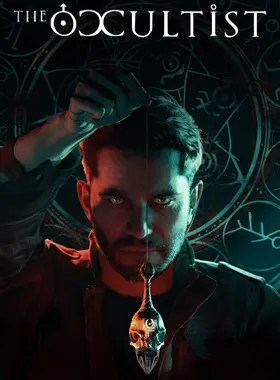
-Mystic Pendulum: the most important object for Alan. Through it, he is able to interact with the environment and modify it due to its four unique and original mechanics.
-1st person action: Experience the foreboding world of The Occultist through the eyes of Alan Rebels and use the mystic pendulum to unravel what happened in Godstone.
-Survival horror: The Occultist has all the distinctive elements of the genre, with tense exploration and atmosphere, as well as an up-close and personal narrative.
-Next-gen graphics: The Occultist has an astonishing level and quality of graphics – for a truly immersive horror experience.
-Hide and Sneak: Alan always avoids direct combat. Using stealth mechanics, he must advance through the story without being caught off-guard.
-Memorable characters: Godstone is populated with adversaries that will make your investigation a real nightmare.
-Puzzles: From straightforward puzzles to those that require knowledge and insight into the occult arts.
-Soundtrack: The Occultist features an original soundtrack by renowned composer Pepe Herrero.
STORY & SETTING
In The Occultist, paranormal investigator Alan Rebels travels to the mysterious island of Godstone to determine the cause of the sudden disappearance of his father. Even though he mentioned the island repeatedly over the decades, all that Alan really knows is that his father was born and spent his early years there.
However, Alan does not travel alone. He carries with him his mystical pendulum, an object of unknown origin that accompanied him on all his past paranormal investigations. As he explores the foggy streets and maddening buildings, apparently being the only things that remain on the mysterious island of Godstone, it becomes clear: This will be a case unlike any other.
Godstone was inhabited until 1950 by an infamous, macabre cult that performed disturbing experiments and cruel rituals. No one has ever set foot on the island since - until today. Using his paranormal talents, Alan must interact with the ominous souls that seem to remain in the foreboding streets and buildings left on Godstone; or avoid them at all cost, should they be wrathful.
Being a paranormal investigator, none of this is new to Alan Rebels. The mysterious Godstone however and his search for answers to his father’s disappearance put Alan’s skills to the test. More than any investigation before, Godstone shakes Alan’s convictions of what is possible in the world of the occult. Maybe Godstone hides a curse that can be lifted… but should it be?
Consola PS4:
1. Ve a PlayStation Store

2. Desplázate hasta la parte inferior de la barra lateral y selecciona Canjear códigos.

3. Ingresa con cuidado el código de 12 dígitos, luego presiona Listo y sigue los pasos para canjear tu código.

4. ¡Felicitaciones! El crédito o contenido ya se aplicó a tu cuenta.
NOTA: Para los juegos de PSN, puedes elegir descargarlos de inmediato o en cualquier momento, solo ve a Biblioteca y luego a Comprados.
Consola PS5:
4. Selecciona Canjear código.
5. Ingresa tu código de 12 dígitos y canjéalo.
6. ¡Felicitaciones! El crédito o contenido ahora se aplica a tu cuenta.
Navegador web
1. Ve al sitio web de PlayStation Store e inicia sesión en tu cuenta de PSN.
2. Haz clic en tu avatar en la parte superior derecha de la pantalla.
3. Selecciona Canjear códigos en el menú desplegable.
4. Ingresa con cuidado el código de 12 dígitos y luego haz clic en Siguiente.
5. Confirma el producto haciendo clic en Agregar fondos/Canjear/Confirmar
6. ¡Felicitaciones! El crédito o contenido ya se aplicó a tu cuenta.
RECORDATORIOS:
Al canjear códigos de PSN, no es necesario agregar letras mayúsculas, espacios en blanco o guiones.
Si la compra no se refleja, intenta lo siguiente:
1. Canje a través de la consola > Reinicia tu consola
2. Canje a través del navegador web > Cierra sesión en Administración de cuentas o sal de PlayStation Store y vuelve a iniciar sesión para actualizar tu cuenta.
3. Visita la Página de estado de PlayStation Network. Espera hasta que las luces estén en verde antes de intentar ingresar el código.
4. Si tu código aparece como usado o no válido, sigue las instrucciones de este artículo.
¿Aún tienes problemas para canjear tu código? Consulta la sección Soluciona errores comunes de PlayStation.¡Sé el primero en reseñar este producto!



Receive 100% genuine software keys, backed by our Flawless Activation guarantee for complete peace of mind.
Your software key is delivered directly to your email inbox within seconds of completing your purchase. No waiting.
Our dedicated support team is available around the clock via live chat and email to assist with installation and activation.
Our 30-day money-back guarantee ensures a fast refund or replacement if your key is faulty or incompatible.
The price you see is the final price you pay. No hidden service fees or surprise charges at the checkout.
Earn valuable points with every purchase and redeem them for real discounts on future software.
A proven track record with thousands of verified, positive reviews from real customers across the globe.
Por qué nuestros clientes nos adoran
Calificado como excelente
Saved a ton on Office 2021. Got my key immediately and it activated without a hitch. EF is the real deal!
by Verified Buyer
Bought a PS Plus membership, code in seconds. Had a minor issue, support resolved it fast. Very impressed!
by Verified Buyer
Doubted a deal this good, but a friend insisted. My Windows 10 Pro key arrived instantly and works perfectly.
by Verified Buyer
Bought Office 2021 at 2am and got my key immediately. I didn’t expect delivery at that hour. Outstanding!
by Verified Buyer
Overseas but still got my code instantly. Xbox Live Gold code redeemed with no region issues. Impressed!
by Verified Buyer
Got Windows 10 Pro & Office 2021 far cheaper than retail. Both keys arrived instantly and activated fine.
by Verified Buyer
Got a Steam game key cheap. Code came instantly, I was playing within minutes of purchase. Can’t beat that!
by Verified Buyer
Bought Windows 11 Pro dirt cheap. Key arrived instantly and activated without issues. Truly 100% legit!
by Verified Buyer
First purchase, was cautious. Fast delivery and legit PS Plus code won me over. I’ll be a repeat buyer.
by Verified Buyer
Bought an Amazon gift card at a discount. Code arrived in seconds and worked perfectly. A lifesaver!
by Verified Buyer
Bought an Xbox Game Pass code at an unbeatable price. Arrived in my email within seconds. Beyond satisfied!
by Verified Buyer
Windows 11 Pro key seemed too cheap. 80k+ reviews convinced me to try them. Code arrived instantly and worked.
by Verified Buyer
Obtenga ingresos adicionales sin esfuerzo uniéndose a nuestro Programa de afiliados
registro de afiliadoÚnase al EF Army para obtener beneficios exclusivos para miembros

Convert coins into real savings at checkout!
Check Dashboard New here? Inscribirse & Track ProgressEarn EF Coins by completing tasks — build up your balance and turn them into wallet credit!

Sea miembro de la comunidad EF

Comprar un producto

Personaliza tu apodo

Añadir foto de perfil

Añadir un producto a la lista de deseos

Reservar un producto por adelantado

Compra 10 productos

Compra 20 productos

Miembro desde hace más de 6 meses

Miembro desde hace más de un año

Deja una reseña
Every 10,000 EF Coins = $1 Credit
Compartir