
Calificado
Residencia en
53,801+
53.8k
Reseñas
Descarga instantánea
Garantía de devolución del 100% del dinero
Soporte 24/7

 Origen
 Mundial
 Descarga digital instantánea
Movimiento rápido 60+ Vendido
Calificado Excelente

Residencia en 53,801+ Reseñas
A reliable experience from purchase to activation. Consistently excellent.
Verified Buyer
Efficient purchase and prompt service—I’ve never been disappointed.
Verified Buyer
I've been a customer for 15 years. Unmatched service and reliable key delivery.
Verified Buyer
I received my PlayStation Plus key promptly, and the setup was effortless.
Verified Buyer
The ordering process was smooth and uncomplicated. Ideal for busy gamers.
Verified Buyer
Windows 11 Pro worked perfectly out of the box—reliable and trustworthy.
Verified Buyer
Descarga instantánea
Garantía de devolución del 100% del dinero
Soporte 24/7
Movimiento rápido 60+ Vendido
Clave de CD Origin de Los Sims 4: DLC Dine Out
Origen
Mundial
Descarga digital instantánea
A reliable experience from purchase to activation. Consistently excellent.
Verified Buyer
Efficient purchase and prompt service—I’ve never been disappointed.
Verified Buyer
I've been a customer for 15 years. Unmatched service and reliable key delivery.
Verified Buyer
I received my PlayStation Plus key promptly, and the setup was effortless.
Verified Buyer
The ordering process was smooth and uncomplicated. Ideal for busy gamers.
Verified Buyer
Windows 11 Pro worked perfectly out of the box—reliable and trustworthy.
Verified Buyer
Sé dueño de un restaurante y lleva a tus Sims a comer con Los Sims™ 4 Dine Out. Crea y administra una variedad de restaurantes, contrata personal y establece el menú perfecto para obtener beneficios y expandir tu negocio. Sal a cenar con los Sims para disfrutar de una cocina experimental completamente nueva y pasar tiempo de calidad con amigos y familiares
.Crea restaurantes únicos. ¿Un restaurante clásico o un exclusivo bistró italiano? Construye el restaurante de tus sueños partiendo de cero o personaliza restaurantes prefabricados con objetos y decoración nuevos. Personalice su espacio con asientos cómodos en las cabinas, letreros exclusivos o asientos al aire libre para divertirse al aire libre
.Posee y administra restaurantes. ¡Contrata a los mejores y despide al resto! Elige uniformes, establece el menú y los precios, y conversa con los comensales para aumentar la satisfacción de los clientes. Intenta conseguir una calificación de cinco estrellas o construye un imperio de varios restaurantes para conseguir un verdadero éxito entre los simoleones.
Sal a cenar con tus Sims.Saca a tus Sims a disfrutar de una deliciosa comida. Reúnete con tus amigos durante un brunch, pasa tiempo con la familia o invita a tus Sims a una cita romántica sin tener que lavar los platos
.Experimenta con comida nueva. ¡Los Sims aventureros pueden probar una nueva cocina experimental que tenga tan buena apariencia como (ojalá) sabor! Los amantes de la buena comida pueden tomarse selfies con la comida para recordar estas obras maestras comestibles. Además, si salen a cenar lo suficiente, sus Sims aprenderán a cocinar estos
platos en casa.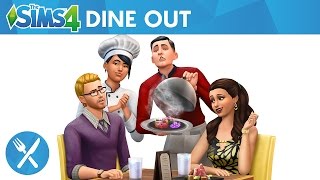
mínimos
de WindowsRecomendado
mínimos
de MacRecomendado
1. Ve a
https://www.ea.com/ea-app para descargar la aplicación EA para Windows2. Inicia sesión en tu Cuenta EA
3. Abre Mi colección.
4. Selecciona Canjear código
5. Introduce tu código, que encontrarás en tu panel de control de EF, y ve a Mis pedidos para encontrar tu código
.6. Sigue las instrucciones para activarlo
.PC
1. Inicia sesión con la Cuenta EA a la que quieres añadir el juego. (Descárgalo e instálalo desde https://www.origin.com/usa/en-us/store/download)
2. Haz clic en el menú Origin y, a continuación, selecciona Canjear código de producto...
3. Introduce el código de producto de 16 dígitos que encontrarás en tu panel de control de EF y, a continuación, ve a Mis pedidos para encontrar tu código
.4. Haz clic en Siguiente.
5. Una vez que hayas registrado el código, el juego debería aparecer en tu biblioteca de juegos, listo para su descarga.
MAC
1. Inicia sesión con la Cuenta EA a la que quieres añadir el juego. (Descárgalo e instálalo desde https://www.origin.com/usa/en-us/store/download)
2. Ve al menú superior de tu ordenador para seleccionar Juegos y canjear el código del producto...
3. Introduce el código de producto de 16 dígitos que encontrarás en tu panel de control de EF y, a continuación, ve a Mis pedidos para encontrar tu código
.4. Haz clic en Siguiente.
5. Una vez que hayas registrado el código, el juego debería aparecer en tu biblioteca de juegos, listo para su descarga.
¡Sé el primero en reseñar este producto!



Receive 100% genuine software keys, backed by our Flawless Activation guarantee for complete peace of mind.
Your software key is delivered directly to your email inbox within seconds of completing your purchase. No waiting.
Our dedicated support team is available around the clock via live chat and email to assist with installation and activation.
Our 30-day money-back guarantee ensures a fast refund or replacement if your key is faulty or incompatible.
The price you see is the final price you pay. No hidden service fees or surprise charges at the checkout.
Earn valuable points with every purchase and redeem them for real discounts on future software.
A proven track record with thousands of verified, positive reviews from real customers across the globe.

Movimiento rápido
343+ Vendido

Movimiento rápido
268+ Vendido

Movimiento rápido
134+ Vendido
Por qué nuestros clientes nos adoran
Calificado como excelente
Saved a ton on Office 2021. Got my key immediately and it activated without a hitch. EF is the real deal!
by Verified Buyer
Bought a PS Plus membership, code in seconds. Had a minor issue, support resolved it fast. Very impressed!
by Verified Buyer
Doubted a deal this good, but a friend insisted. My Windows 10 Pro key arrived instantly and works perfectly.
by Verified Buyer
Bought Office 2021 at 2am and got my key immediately. I didn’t expect delivery at that hour. Outstanding!
by Verified Buyer
Overseas but still got my code instantly. Xbox Live Gold code redeemed with no region issues. Impressed!
by Verified Buyer
Got Windows 10 Pro & Office 2021 far cheaper than retail. Both keys arrived instantly and activated fine.
by Verified Buyer
Got a Steam game key cheap. Code came instantly, I was playing within minutes of purchase. Can’t beat that!
by Verified Buyer
Bought Windows 11 Pro dirt cheap. Key arrived instantly and activated without issues. Truly 100% legit!
by Verified Buyer
First purchase, was cautious. Fast delivery and legit PS Plus code won me over. I’ll be a repeat buyer.
by Verified Buyer
Bought an Amazon gift card at a discount. Code arrived in seconds and worked perfectly. A lifesaver!
by Verified Buyer
Bought an Xbox Game Pass code at an unbeatable price. Arrived in my email within seconds. Beyond satisfied!
by Verified Buyer
Windows 11 Pro key seemed too cheap. 80k+ reviews convinced me to try them. Code arrived instantly and worked.
by Verified Buyer
Obtenga ingresos adicionales sin esfuerzo uniéndose a nuestro Programa de afiliados
registro de afiliadoÚnase al EF Army para obtener beneficios exclusivos para miembros

Convert coins into real savings at checkout!
Check Dashboard New here? Inscribirse & Track ProgressEarn EF Coins by completing tasks — build up your balance and turn them into wallet credit!

Sea miembro de la comunidad EF

Comprar un producto

Personaliza tu apodo

Añadir foto de perfil

Añadir un producto a la lista de deseos

Reservar un producto por adelantado

Compra 10 productos

Compra 20 productos

Miembro desde hace más de 6 meses

Miembro desde hace más de un año

Deja una reseña
Every 10,000 EF Coins = $1 Credit


Compartir