
Rated
based on
53,801+
53.8k
reviews
6-12 Hours Delivery
100% Money Back Guarantee
24/7 Support
 Steam Pre Loaded
 Worldwide
 6-12 Hours
Rated Excellent

Based on 53,801+ reviews
A reliable experience from purchase to activation. Consistently excellent.
Verified Buyer
Efficient purchase and prompt service—I’ve never been disappointed.
Verified Buyer
I've been a customer for 15 years. Unmatched service and reliable key delivery.
Verified Buyer
I received my PlayStation Plus key promptly, and the setup was effortless.
Verified Buyer
The ordering process was smooth and uncomplicated. Ideal for busy gamers.
Verified Buyer
Windows 11 Pro worked perfectly out of the box—reliable and trustworthy.
Verified Buyer
6-12 Hours Delivery
100% Money Back Guarantee
24/7 Support
Crypt Custodian PC Steam Account
Steam Pre Loaded
Worldwide
6-12 Hours
A reliable experience from purchase to activation. Consistently excellent.
Verified Buyer
Efficient purchase and prompt service—I’ve never been disappointed.
Verified Buyer
I've been a customer for 15 years. Unmatched service and reliable key delivery.
Verified Buyer
I received my PlayStation Plus key promptly, and the setup was effortless.
Verified Buyer
The ordering process was smooth and uncomplicated. Ideal for busy gamers.
Verified Buyer
Windows 11 Pro worked perfectly out of the box—reliable and trustworthy.
Verified Buyer
You will be sent a new account preloaded with the game. No refunds will be issued for banned accounts. Please read our Terms in the description.
1. This is NOT a game key. You will be sent a new Steam account made for you and preloaded with the game.
2. Under certain conditions, (e.g. customer error when making order, incorrect game/account delivered) or any error in the ordering process. Please contact us to determine the eligibility for refunds and returns.
3.The following circumstances are NOT ELIGIBLE FOR REFUNDS/RETURNS.
3a. Your account might be limited and some games are excluded from Family Sharing, therefore we don't guarantee that you will be able to share your game with your main account. NO REFUNDS for disabled family sharing reason.
3b. Accounts with more than 1 hour of playtime.
3c. Accounts banned /locked for any of the following reasons:
- Attaching your brand-new Steam account to an existing Activision account risks a ban.
- Adding funds to the account's wallet risks a ban as well. Thus, please avoid adding funds to the account.
- Changing the country
Unlock endless gaming possibilities with the Crypt Custodian PC Steam Account! This account offers access to a carefully curated selection of games, providing hours of entertainment for both new and seasoned gamers. Whether you're looking to explore new titles or revisit classics, this account is the perfect way to expand your gaming library. Gift this account to a friend or keep it for yourself and dive into the world of gaming!
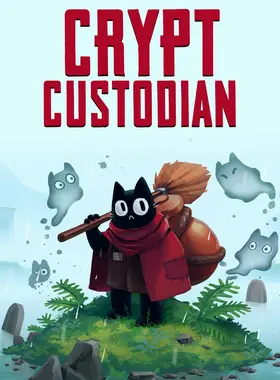
Crypt Custodian is a charming metroidvania/zelda-like about cleaning up the afterlife.
You play as Pluto - a mischievous cat who has just died, and landed in the afterlife's palace. After a brief and disastrous meeting with the Afterlife Guardian - Kendra - you are banished from the palace and sentenced to clean... FOREVER!!
Explore the vast grounds that surround the palace, battle beasts with your trusty broom, and gain new abilities to expand your map. Solve puzzles, discover secrets, and… organize an ambush to break back into the palace!
A Charming Cast Of Characters
Meet and befriend all the other bad ghosts who live outside the palace. Learn how they died, and what caused them to face eternal banishment! And then head on over to the local haunt- The Sinner’s Inn- to chat with the ghosts you meet, and upgrade your gear.
Tons of Upgrades
Complete puzzles, battle epic bosses, and clean your way through ruined dungeons in order to collect new upgrades and abilities. Customize your play style by mix-and-matching your upgrades, and use the abilities you collect to expand your world.
A Lively Interconnected World
Traverse a vast landscape with secrets hiding at every corner. Form your own path and discover the afterlife’s many secrets at your own pace.

Launch the Steam client and log in to your Steam account. (If you don't have it, download and install it from here)

On the lower-left corner, click on Click + ADD A GAME, then select Activate a Product on Steam...

A Product Activation window will pop up, just click Next.

Read the Agreement, and click I Agree.

Enter the Steam game code and hit Next.

Click Finish.
At this point, you can choose to download/install the game on your PC now or do it at a later time. You will find your game in your Steam Library.
Go to Activate a Product on Steam, make sure you are already logged in to your Steam account.
Enter your Steam product code on the space provided, tick the I agree box, then click Continue.
The game will now be added to your Steam Library.

Launch the Steam Client using the Steam credentials sent to your email address. (If you don't have it, download and install it from the official Steam website).

To get the verification code, log in to the Electronic First Email Login using the Email Credentials sent to your email address, and enter the verification code on Steam.
Make sure that the content on the account is correct (e.g., correct edition of the game, no playtime, etc.).
Change the credentials to make the account your own. We recommend you do this as soon as possible:
- Change the email
- Change the password
- Enable Two-Factor Authentication (Steam Guard)
The account should be used solely to access the purchased game or content. It is NOT RECOMMENDED to use it as your primary account, as it may cause issues when making purchases.
To help you enable Steam Family Sharing and to play this game on your main Steam account, please follow the instructions in this video guide on enabling Steam Family Sharing.
Note: Due to technical limitations, some Steam games may be unavailable for sharing. For example, titles that require an additional third-party key, account, or subscription in order to play cannot be shared between accounts.
Important: Applying any changes to the purchased account, such as adding a payment method or changing the region, may result in the account being banned. In such cases, no refund is applicable.
Having trouble redeeming your code? Check out the Fix Common Errors for Steam guide.
Be the first to review this product!



Receive 100% genuine software keys, backed by our Flawless Activation guarantee for complete peace of mind.
Your software key is delivered directly to your email inbox within seconds of completing your purchase. No waiting.
Our dedicated support team is available around the clock via live chat and email to assist with installation and activation.
Our 30-day money-back guarantee ensures a fast refund or replacement if your key is faulty or incompatible.
The price you see is the final price you pay. No hidden service fees or surprise charges at the checkout.
Earn valuable points with every purchase and redeem them for real discounts on future software.
A proven track record with thousands of verified, positive reviews from real customers across the globe.

Best Seller
2.2K+ Sold

Best Seller
1.2K+ Sold

Best Seller
1.1K+ Sold
Why our Customers Love Us
Rated Excellent
Saved a ton on Office 2021. Got my key immediately and it activated without a hitch. EF is the real deal!
by Verified Buyer
Bought a PS Plus membership, code in seconds. Had a minor issue, support resolved it fast. Very impressed!
by Verified Buyer
Doubted a deal this good, but a friend insisted. My Windows 10 Pro key arrived instantly and works perfectly.
by Verified Buyer
Bought Office 2021 at 2am and got my key immediately. I didn’t expect delivery at that hour. Outstanding!
by Verified Buyer
Overseas but still got my code instantly. Xbox Live Gold code redeemed with no region issues. Impressed!
by Verified Buyer
Got Windows 10 Pro & Office 2021 far cheaper than retail. Both keys arrived instantly and activated fine.
by Verified Buyer
Got a Steam game key cheap. Code came instantly, I was playing within minutes of purchase. Can’t beat that!
by Verified Buyer
Bought Windows 11 Pro dirt cheap. Key arrived instantly and activated without issues. Truly 100% legit!
by Verified Buyer
First purchase, was cautious. Fast delivery and legit PS Plus code won me over. I’ll be a repeat buyer.
by Verified Buyer
Bought an Amazon gift card at a discount. Code arrived in seconds and worked perfectly. A lifesaver!
by Verified Buyer
Bought an Xbox Game Pass code at an unbeatable price. Arrived in my email within seconds. Beyond satisfied!
by Verified Buyer
Windows 11 Pro key seemed too cheap. 80k+ reviews convinced me to try them. Code arrived instantly and worked.
by Verified Buyer
Join the EF Army for exclusive member benefits

Convert coins into real savings at checkout!
Check Dashboard New here? Sign Up & Track ProgressEarn EF Coins by completing tasks — build up your balance and turn them into wallet credit!

Be a member of the EF community

Purchase a product

Personalise your nickname

Add profile picture

Add a product to wishlist

Pre-order a product

Purchase 10 products

Purchase 20 products

Member for more than 6 months

Member for more than a year

Leave a review
Every 10,000 EF Coins = $1 Credit


Share