
Bewertet
Basiert auf
53,801+
53.8k
Bewertungen
Sofortiger Download
100% Geld-zurück-Garantie
Unterstützung rund um die Uhr
 Dampf
Dampf
 Weltweit
 Instant Download
Sofortiger Download
100% Geld-zurück-Garantie
Unterstützung rund um die Uhr
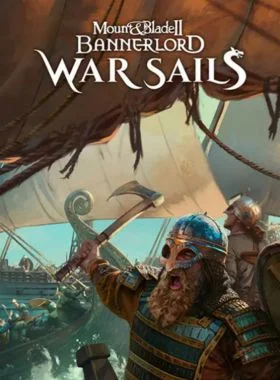
Mount & Blade II: Bannerlord - War Sails DLC PC Steam CD Key
Dampf
Weltweit
Instant Download
Requires the base game Mount & Blade II: Bannerlord on PC Steam in order to play.
Mount & Blade II: Bannerlord - War Sails
Sail the high seas, lead mighty fleets, and forge your legacy in War Sails, the epic single-player expansion for Mount & Blade II: Bannerlord. Bringing naval warfare to Bannerlord for the first time, War Sails lets players command powerful ships, engage in thrilling sea battles, and master maritime conquest.
Embark on daring naval adventures with new mechanics, territories, and challenges. Customize your fleet, conquer settlements, and carve your legend on the high seas!
MEET THE NORDS, A NEW VIKING-INSPIRED FACTION
Chart your course to the Northern Kingdom, home of the fearless Nords—legendary seafarers and masters of close-quarters combat. Explore a land of jagged peaks, vast taigas and freezing fjords, where scattered settlements rise like ships from the sea. A bold adventurer may trade their goods, recruit their warriors, join their ranks or challenge their rule. Will you join the North or seize its riches?
MASTER NAVAL WARFARE
War Sails introduces a unique and immersive naval warfare system that has been inspired by accounts of actual medieval sea battles. Featuring realistic wind and water physics, ship-to-ship combat lets you board enemies from multiple points, ram them, or attack from afar.
Captains can seize opportunities by boarding already engaged ships, prepare for an incoming attack by creating a floating fortress or take a risk to tie down several enemies at once - giving their allies an edge elsewhere. They may ram an enemy ship to sink it - or at least throw men off board, shatter oars and compromise buoyancy. Well-placed arrows and ballista fire can also tear through sails, further crippling mobility.
EXPLORE AN EXPANDED WORLD
Calradia has been reimagined with a northern region, a settled island, coastal waters and open seas. The dynamic weather system was also refined to include storms and trade winds. Ships move faster when riding the gales, but beware—attrition can unravel even the best-laid plans.
The naval systems and Nord faction integrate into Bannerlord’s world, reshaping trade, warfare, and diplomacy. Ship production and new trade goods add regional variety. Coastal towns may grow rich from this — if they can fend off pirates and naval invasions.
Sieges have also been adapted to naval warfare. Armies will have to bring along a fleet and set up a blockade, if they want to stop supplies and reinforcements arriving over sea.
BUILD YOUR FLEET
Players can choose from 18 ship types modelled after historical vessels, each with unique handling, shaped by realistic wind and wave physics. They can be customized with siege engines, cargo holds, sails, rams, and more. Shipyards build and stock vessels based on their town’s culture and development. Players can also capture ships and figureheads in battle.
EXPAND YOUR ARSENAL
The character system has been extended with Nord hairstyles, beards, and tattoos. Three nautical skills were added that enhance navigation, tactics, and stewardship. There are also many new items including spears, swords, axes, shields, and armor.
Troop trees now include mariner troops that are more effective at sea. Players can also recruit new companions with maritime backgrounds.
LEARN THE ROPES
A new questline introduces players to the seas of Calradia through cinematics, scripted missions, and classic Mount & Blade gameplay. Learn how to command your ship, then take it into battle against a pirate confederacy. Lead a growing fleet of newfound allies as you face a range of nautical challenges.
ENHANCED AUDIO
The sounds of the sea come to life with new Mediterranean and Nordic-inspired musical tracks. Experience rich soundscapes with piercing winds, crashing waves and creaking ships. Feel the heat of battle as steel clashes and sailors cry out.
Starten Sie den Steam-Client und melden Sie sich bei Ihrem Steam-Konto an. (Wenn Sie es nicht haben, laden Sie es hier herunter und installieren Sie es)

Klicken Sie in der unteren linken Ecke auf „+ SPIEL HINZUFÜGEN“ und wählen Sie dann „Produkt auf Steam aktivieren...“ aus.

Ein Fenster zur Produktaktivierung wird angezeigt. Klicken Sie einfach auf Weiter.

Lesen Sie die Vereinbarung und klicken Sie auf Ich stimme zu.

Geben Sie den Steam-Spielcode ein und klicken Sie auf Weiter.

Klicken Sie auf „Fertig“.
An diesem Punkt können Sie wählen, ob Sie das Spiel jetzt auf Ihren PC herunterladen/installieren möchten oder dies zu einem späteren Zeitpunkt tun möchten. Sie finden Ihr Spiel in Ihrer Steam-Bibliothek.
Gehen Sie zu Produkt auf Steam aktivieren und stellen Sie sicher, dass Sie bereits bei Ihrem Steam-Konto angemeldet sind.
Geben Sie Ihren Steam-Produktcode in das dafür vorgesehene Feld ein, aktivieren Sie das Kontrollkästchen „Ich stimme zu“ und klicken Sie dann auf „Fortfahren“.
Das Spiel wird nun zu Ihrer Steam-Bibliothek hinzugefügt.

Starten Sie den Steam-Client mit den Steam-Anmeldeinformationen, die an Ihre E-Mail-Adresse gesendet wurden. (Wenn Sie es nicht haben, laden Sie es hier herunter und installieren Sie es)

Um den Bestätigungscode zu erhalten, melden Sie sich mit den an Ihre E-Mail-Adresse gesendeten E-Mail-Anmeldeinformationen bei der E-Mail-Anmelde-URL hier an und geben Sie den Bestätigungscode auf Steam ein.
Um Ihnen dabei zu helfen, Steam Family Sharing zu aktivieren und dieses Spiel auf Ihrem Haupt-Steam-Konto zu spielen, folgen Sie bitte die Anweisungen in diesem Video.
HINWEIS: Aufgrund technischer Einschränkungen können einige Steam-Spiele möglicherweise nicht geteilt werden. Beispielsweise können Titel, für deren Spielen ein zusätzlicher Drittanbieterschlüssel, ein Konto oder ein Abonnement erforderlich ist, nicht zwischen Konten geteilt werden.
Sie besitzen jetzt 100 % dieses Kontos. Sie können alle persönlichen Daten dieses Kontos jederzeit ändern. Wir können Ihrem Konto in Zukunft weitere Spiele zu günstigen Preisen hinzufügen. Lassen Sie uns einfach wissen, welches Steam-Spiel Sie kaufen möchten, und wir erstellen Ihnen ein individuelles Angebot.
Haben Sie Probleme beim Einlösen Ihres Codes? Sehen Sie sich die Anleitung zum Beheben häufiger Fehler für Steam an.
Seien Sie der Erste, der dieses Produkt bewertet!



Receive 100% genuine software keys, backed by our Flawless Activation guarantee for complete peace of mind.
Your software key is delivered directly to your email inbox within seconds of completing your purchase. No waiting.
Our dedicated support team is available around the clock via live chat and email to assist with installation and activation.
Our 30-day money-back guarantee ensures a fast refund or replacement if your key is faulty or incompatible.
The price you see is the final price you pay. No hidden service fees or surprise charges at the checkout.
Earn valuable points with every purchase and redeem them for real discounts on future software.
A proven track record with thousands of verified, positive reviews from real customers across the globe.

Bestseller
520+ Verkauft

Bestseller
510+ Verkauft

Schneller Mover
431+ Verkauft
Warum unsere Kunden uns lieben
Als ausgezeichnet bewertet
Saved a ton on Office 2021. Got my key immediately and it activated without a hitch. EF is the real deal!
by Verified Buyer
Bought a PS Plus membership, code in seconds. Had a minor issue, support resolved it fast. Very impressed!
by Verified Buyer
Doubted a deal this good, but a friend insisted. My Windows 10 Pro key arrived instantly and works perfectly.
by Verified Buyer
Bought Office 2021 at 2am and got my key immediately. I didn’t expect delivery at that hour. Outstanding!
by Verified Buyer
Overseas but still got my code instantly. Xbox Live Gold code redeemed with no region issues. Impressed!
by Verified Buyer
Got Windows 10 Pro & Office 2021 far cheaper than retail. Both keys arrived instantly and activated fine.
by Verified Buyer
Got a Steam game key cheap. Code came instantly, I was playing within minutes of purchase. Can’t beat that!
by Verified Buyer
Bought Windows 11 Pro dirt cheap. Key arrived instantly and activated without issues. Truly 100% legit!
by Verified Buyer
First purchase, was cautious. Fast delivery and legit PS Plus code won me over. I’ll be a repeat buyer.
by Verified Buyer
Bought an Amazon gift card at a discount. Code arrived in seconds and worked perfectly. A lifesaver!
by Verified Buyer
Bought an Xbox Game Pass code at an unbeatable price. Arrived in my email within seconds. Beyond satisfied!
by Verified Buyer
Windows 11 Pro key seemed too cheap. 80k+ reviews convinced me to try them. Code arrived instantly and worked.
by Verified Buyer
Verdienen Sie zusätzliche, mühelose Einnahmen,
indem Sie unserem Affiliate-Programm beitreten
Treten Sie der EF Army bei und profitieren Sie von exklusiven Mitgliedervorteilen

Convert coins into real savings at checkout!
Check Dashboard New here? Melde dich an & Track ProgressEarn EF Coins by completing tasks — build up your balance and turn them into wallet credit!

Sei ein Mitglied der EF-Community

Ein Produkt kaufen

Personalisiere deinen Spitznamen

Profilbild hinzufügen

Produkt zur Wunschliste hinzufügen

Ein Produkt vorbestellen

10 Produkte kaufen

20 Produkte kaufen

Mitglied seit mehr als 6 Monaten

Mitglied seit mehr als einem Jahr

Hinterlassen Sie eine Bewertung
Every 10,000 EF Coins = $1 Credit

Teilen