
Bewertet
Basiert auf
85,278+
85.3k
Bewertungen
Sofortiger Download
100% Geld-zurück-Garantie
Unterstützung rund um die Uhr
 Dampf
Dampf
 Weltweit
 6-12 Stunden
Sofortiger Download
100% Geld-zurück-Garantie
Unterstützung rund um die Uhr
Dampf
Weltweit
6-12 Stunden
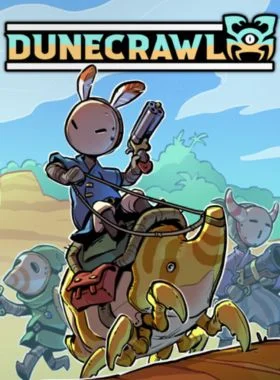
DuneCrawl is an open world action-adventure game where you and up to three friends explore the sandy seas atop a gigantic Crab Crawler.
Battle against the jar-headed Vassals, survive hordes of wild bugs, explore oasis islands and delve devious dungeons all to help your fellow Polloi pilgrims win their war against the Ceramicist’s invasion!
Key Feature
COOP AND SOLO PLAY:
Adventure in local or online coop with up to 4 players, or take to the wastelands by yourself with a bit of help from a ghostly companion!
OPEN WORLD EXPLORATION:
Navigate your Dune Crawler through the desert and visit dozens of islands to complete quests, explore secret dungeons, and collect piles of loot!
UPGRADE YOUR ARSENAL:
Gain powerful new player abilities by collecting Masks, Tunics, and Talismans! Unlock weapons like the Buzzooka and Acid Harpoon! Deck out your Dune Crawler with upgrades like Spike Armoured legs and Guided Torpedoes (or just give her a new hat and sporty paintjob)!
CRUSTACEAN COMBAT:
Man the cannons and take the helm with your crew to fight against other crawlers, gigantic bosses, and island fortresses! Load cannonballs, repair damaged legs, and even launch yourself through the air for daring boarding actions!
BUG RIDING:
Giant crabs aren’t your only form of arthropodic locomotion! Team up with friends to ride multi-saddle Beetles, zip around on skittering Nymphs, or smash through any opposition with armoured Scorpions and Ball Bugs!
SWASHBUCKLING ACTION:
Sometimes fighting on two feet is best! Help your fellow Polloi fight off the Vassal invaders with a wide array of hand weapons and items, or make use of the deadly local wildlife with Bomb Flowers, Beehives, and Spider Eggs!

Starten Sie den Steam-Client und melden Sie sich bei Ihrem Steam-Konto an. (Wenn Sie es nicht haben, laden Sie es hier herunter und installieren Sie es)

Klicken Sie in der unteren linken Ecke auf „+ SPIEL HINZUFÜGEN“ und wählen Sie dann „Produkt auf Steam aktivieren...“ aus.

Ein Fenster zur Produktaktivierung wird angezeigt. Klicken Sie einfach auf Weiter.

Lesen Sie die Vereinbarung und klicken Sie auf Ich stimme zu.

Geben Sie den Steam-Spielcode ein und klicken Sie auf Weiter.

Klicken Sie auf „Fertig“.
An diesem Punkt können Sie wählen, ob Sie das Spiel jetzt auf Ihren PC herunterladen/installieren möchten oder dies zu einem späteren Zeitpunkt tun möchten. Sie finden Ihr Spiel in Ihrer Steam-Bibliothek.
Gehen Sie zu Produkt auf Steam aktivieren und stellen Sie sicher, dass Sie bereits bei Ihrem Steam-Konto angemeldet sind.
Geben Sie Ihren Steam-Produktcode in das dafür vorgesehene Feld ein, aktivieren Sie das Kontrollkästchen „Ich stimme zu“ und klicken Sie dann auf „Fortfahren“.
Das Spiel wird nun zu Ihrer Steam-Bibliothek hinzugefügt.

Starten Sie den Steam-Client mit den Steam-Anmeldeinformationen, die an Ihre E-Mail-Adresse gesendet wurden. (Wenn Sie es nicht haben, laden Sie es hier herunter und installieren Sie es)

Um den Bestätigungscode zu erhalten, melden Sie sich mit den an Ihre E-Mail-Adresse gesendeten E-Mail-Anmeldeinformationen bei der E-Mail-Anmelde-URL hier an und geben Sie den Bestätigungscode auf Steam ein.
Um Ihnen dabei zu helfen, Steam Family Sharing zu aktivieren und dieses Spiel auf Ihrem Haupt-Steam-Konto zu spielen, folgen Sie bitte die Anweisungen in diesem Video.
HINWEIS: Aufgrund technischer Einschränkungen können einige Steam-Spiele möglicherweise nicht geteilt werden. Beispielsweise können Titel, für deren Spielen ein zusätzlicher Drittanbieterschlüssel, ein Konto oder ein Abonnement erforderlich ist, nicht zwischen Konten geteilt werden.
Sie besitzen jetzt 100 % dieses Kontos. Sie können alle persönlichen Daten dieses Kontos jederzeit ändern. Wir können Ihrem Konto in Zukunft weitere Spiele zu günstigen Preisen hinzufügen. Lassen Sie uns einfach wissen, welches Steam-Spiel Sie kaufen möchten, und wir erstellen Ihnen ein individuelles Angebot.
Haben Sie Probleme beim Einlösen Ihres Codes? Sehen Sie sich die Anleitung zum Beheben häufiger Fehler für Steam an.
Seien Sie der Erste, der dieses Produkt bewertet!



Receive 100% genuine software keys, backed by our Flawless Activation guarantee for complete peace of mind.
Your software key is delivered directly to your email inbox within seconds of completing your purchase. No waiting.
Our dedicated support team is available around the clock via live chat and email to assist with installation and activation.
Our 30-day money-back guarantee ensures a fast refund or replacement if your key is faulty or incompatible.
The price you see is the final price you pay. No hidden service fees or surprise charges at the checkout.
Earn valuable points with every purchase and redeem them for real discounts on future software.
A proven track record with thousands of verified, positive reviews from real customers across the globe.
Warum unsere Kunden uns lieben
Als ausgezeichnet bewertet
Saved a ton on Office 2021. Got my key immediately and it activated without a hitch. EF is the real deal!
by Verified Buyer
Bought a PS Plus membership, code in seconds. Had a minor issue, support resolved it fast. Very impressed!
by Verified Buyer
Doubted a deal this good, but a friend insisted. My Windows 10 Pro key arrived instantly and works perfectly.
by Verified Buyer
Bought Office 2021 at 2am and got my key immediately. I didn’t expect delivery at that hour. Outstanding!
by Verified Buyer
Overseas but still got my code instantly. Xbox Live Gold code redeemed with no region issues. Impressed!
by Verified Buyer
Got Windows 10 Pro & Office 2021 far cheaper than retail. Both keys arrived instantly and activated fine.
by Verified Buyer
Got a Steam game key cheap. Code came instantly, I was playing within minutes of purchase. Can’t beat that!
by Verified Buyer
Bought Windows 11 Pro dirt cheap. Key arrived instantly and activated without issues. Truly 100% legit!
by Verified Buyer
First purchase, was cautious. Fast delivery and legit PS Plus code won me over. I’ll be a repeat buyer.
by Verified Buyer
Bought an Amazon gift card at a discount. Code arrived in seconds and worked perfectly. A lifesaver!
by Verified Buyer
Bought an Xbox Game Pass code at an unbeatable price. Arrived in my email within seconds. Beyond satisfied!
by Verified Buyer
Windows 11 Pro key seemed too cheap. 80k+ reviews convinced me to try them. Code arrived instantly and worked.
by Verified Buyer
Verdienen Sie zusätzliche, mühelose Einnahmen,
indem Sie unserem Affiliate-Programm beitreten
Treten Sie der EF Army bei und profitieren Sie von exklusiven Mitgliedervorteilen


Convert coins into real savings at checkout!
Check Dashboard New here? Melde dich an & Track ProgressEarn EF Coins by completing tasks — build up your balance and turn them into wallet credit!

Sei ein Mitglied der EF-Community

Ein Produkt kaufen

Personalisiere deinen Spitznamen

Profilbild hinzufügen

Produkt zur Wunschliste hinzufügen

Ein Produkt vorbestellen

10 Produkte kaufen

20 Produkte kaufen

Mitglied seit mehr als 6 Monaten

Mitglied seit mehr als einem Jahr

Hinterlassen Sie eine Bewertung
Every 10,000 EF Coins = $1 Credit
Teilen