
Calificado
Residencia en
53,801+
53.8k
Reseñas
Descarga instantánea
Garantía de devolución del 100% del dinero
Soporte 24/7
 Vapor
Vapor
 Mundial
 Instant Download
Descarga instantánea
Garantía de devolución del 100% del dinero
Soporte 24/7
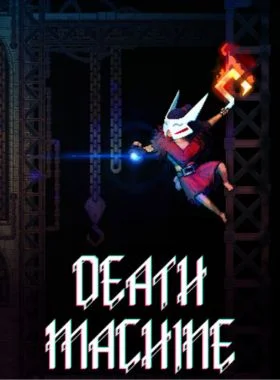
Death Machine PC Steam CD Key
Vapor
Mundial
Instant Download
Rejecting the dogmatic vision of the machine and its endless production, you are cast down into darkness. But in the darkness, a bargain is struck with a foe of old. Ascend the machine citadel with eyes open, and bring a reckoning upon those who ruined the world before it was all iron, blood, and bones.
FEATURES
ROGUELITE METROIDVANIA - Explore the machine citadel, find secret paths to hidden chambers, and establish a foothold in the belly of the machine. Return to a Sanctuary with your plundered skulls to discover new and unusual items. Or instead, set your sights on conquest, assemble a clutch of potent items, and risk it all against the monstrous denizens that lurk in the dark corners of the citadel. But beware, your mayhem in defiance of the machine will not go unnoticed - enemies assembled to defeat you will grow in potency and number the longer you wreak havoc.
EXPLORE THE MACHINE - Death Machine mixes the wonder of classic metroidvania exploration, with exciting combat powered by a versatile roguelite item system. Each run, you can choose to focus on exploration - discovering new items and powers, hoarding skulls taken from your enemies, and making it back to take to a Sanctuary to cash in your loot with your patron.
WREAK DEMONIC HAVOC - Use the spoils of your exploration to concoct mighty builds, letting you go toe to toe with the most dangerous residents of the citadel. Careful consideration when crafting your build will help you unlock certain pathways not accessible otherwise. Diverse builds will also let you wield potent hybrid items, bridging the mechanics of two elements together.

Abre el cliente de Steam e inicia sesión en tu cuenta de Steam. (Si no lo tienes, descárgalo e instálalo desde aquí)

En la esquina inferior izquierda, haz clic en Haz clic en + AGREGAR UN JUEGO, luego selecciona Activar un producto en Steam...

Aparecerá una ventana de Activación del producto, solo haz clic en Siguiente.

Lee el Acuerdo y haz clic en Acepto.

Ingresa el código del juego de Steam y haz clic en Siguiente.

Haz clic en Finalizar.
En este punto, puedes elegir descargar/instalar el juego en tu PC ahora o hacerlo más tarde. Encontrarás tu juego en tu biblioteca de Steam.
Ve a Activar un producto en Steam y asegúrate de que ya hayas iniciado sesión en tu cuenta de Steam.
Ingresa tu código de producto de Steam en el espacio provisto, marca la casilla Acepto y luego haz clic en Continuar.
El juego se agregará a tu biblioteca de Steam.

Abre el cliente de Steam con las credenciales de Steam enviadas a tu dirección de correo electrónico. (Si no lo tienes, descárgalo e instálalo desde aquí)

Para obtener el código de verificación, inicia sesión en la URL de inicio de sesión por correo electrónico aquí usando las credenciales de correo electrónico enviadas a tu dirección de correo electrónico e ingresa el código de verificación en Steam.
Para ayudarte a habilitar Steam Family Sharing y jugar este juego en tu cuenta principal de Steam, sigue las instrucciones de este video.
NOTA: Debido a limitaciones técnicas, algunos juegos de Steam pueden no estar disponibles para compartir. Por ejemplo, los títulos que requieren una clave, cuenta o suscripción de terceros adicional para jugar no se pueden compartir entre cuentas.
Ahora tienes el 100 % de propiedad de esta cuenta, no dudes en cambiar todos los datos personales de esta cuenta. Podemos agregar más juegos a tu cuenta a precios económicos en el futuro. Solo dinos qué juego de Steam te gustaría comprar y haremos una oferta personalizada para ti.
¿Tienes problemas para canjear tu código? Consulta Solucionar errores comunes para Steam.
¡Sé el primero en reseñar este producto!



Receive 100% genuine software keys, backed by our Flawless Activation guarantee for complete peace of mind.
Your software key is delivered directly to your email inbox within seconds of completing your purchase. No waiting.
Our dedicated support team is available around the clock via live chat and email to assist with installation and activation.
Our 30-day money-back guarantee ensures a fast refund or replacement if your key is faulty or incompatible.
The price you see is the final price you pay. No hidden service fees or surprise charges at the checkout.
Earn valuable points with every purchase and redeem them for real discounts on future software.
A proven track record with thousands of verified, positive reviews from real customers across the globe.

Mejor vendido
520+ Vendido

Mejor vendido
510+ Vendido

Movimiento rápido
431+ Vendido
Por qué nuestros clientes nos adoran
Calificado como excelente
Saved a ton on Office 2021. Got my key immediately and it activated without a hitch. EF is the real deal!
by Verified Buyer
Bought a PS Plus membership, code in seconds. Had a minor issue, support resolved it fast. Very impressed!
by Verified Buyer
Doubted a deal this good, but a friend insisted. My Windows 10 Pro key arrived instantly and works perfectly.
by Verified Buyer
Bought Office 2021 at 2am and got my key immediately. I didn’t expect delivery at that hour. Outstanding!
by Verified Buyer
Overseas but still got my code instantly. Xbox Live Gold code redeemed with no region issues. Impressed!
by Verified Buyer
Got Windows 10 Pro & Office 2021 far cheaper than retail. Both keys arrived instantly and activated fine.
by Verified Buyer
Got a Steam game key cheap. Code came instantly, I was playing within minutes of purchase. Can’t beat that!
by Verified Buyer
Bought Windows 11 Pro dirt cheap. Key arrived instantly and activated without issues. Truly 100% legit!
by Verified Buyer
First purchase, was cautious. Fast delivery and legit PS Plus code won me over. I’ll be a repeat buyer.
by Verified Buyer
Bought an Amazon gift card at a discount. Code arrived in seconds and worked perfectly. A lifesaver!
by Verified Buyer
Bought an Xbox Game Pass code at an unbeatable price. Arrived in my email within seconds. Beyond satisfied!
by Verified Buyer
Windows 11 Pro key seemed too cheap. 80k+ reviews convinced me to try them. Code arrived instantly and worked.
by Verified Buyer
Obtenga ingresos adicionales sin esfuerzo uniéndose a nuestro Programa de afiliados
registro de afiliadoÚnase al EF Army para obtener beneficios exclusivos para miembros

Convert coins into real savings at checkout!
Check Dashboard New here? Inscribirse & Track ProgressEarn EF Coins by completing tasks — build up your balance and turn them into wallet credit!

Sea miembro de la comunidad EF

Comprar un producto

Personaliza tu apodo

Añadir foto de perfil

Añadir un producto a la lista de deseos

Reservar un producto por adelantado

Compra 10 productos

Compra 20 productos

Miembro desde hace más de 6 meses

Miembro desde hace más de un año

Deja una reseña
Every 10,000 EF Coins = $1 Credit

Compartir