
Calificado
Residencia en
53,801+
53.8k
Reseñas
Descarga instantánea
Garantía de devolución del 100% del dinero
Soporte 24/7
 PS5 PLAYSTATION 5
 United States
 Instant Download
Descarga instantánea
Garantía de devolución del 100% del dinero
Soporte 24/7
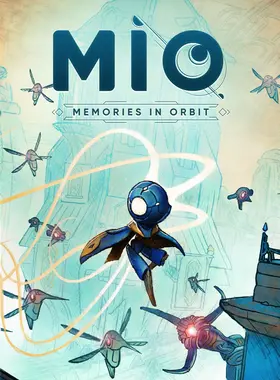
Mio: Memories in Orbit PS5 US
PS5 PLAYSTATION 5
United States
Instant Download
Please Note - You will be sent gift cards equal to or above the market value of this product to add to your wallet on the PlayStation Store.
Just Redeem the codes and purchase 'Mio: Memories in Orbit PS5 US' directly from the PlayStation store.
Includes:
Revive the memories of the vessel
A mesmerizing, intertwined, decaying world awaits.
You are MIO, a nimble robot with extraordinary abilities. You wake up in the Vessel, a space ship drifting aimlessly in space.This enormous technological ark, whose initial purpose remains unknown, lies now as a field of ruins, overgrown with lush vegetation and machines gone rogue.
Nobody knows why the Pearls, The Vessel's AI caretakers, have ceased functioning. Forgotten by all, the Vessel faces imminent shutdown. Dive into its depths to revive its lost memories, as you unravel your true past and destiny.
Explore a captivating world
Delve into this mesmerizing metroidvania, as you guide MIO through the vast expanse of the Vessel. You won’t be alone on your journey. Repair damaged robots and help them to unveil the Ark's past and gain valuable bonuses. Interact with the environment to learn more about its past and memories. Unravel the dark secrets behind its tragic blackout. And let your curiosity guide you as you discover its many secret pathways.
Behold and artistic wonder
Experience a magnificent world of breathtaking scenery and innumerable details. Inspired by comics, paintings, and anime, its universe is full of wonder and artistic curiosities. Let its unique and dynamic soundtrack, blending lo-fi beats and choral melodies, carry you through this captivating universe.
Keep on the move
As a gigantic labyrinth, the Vessel is a true living organism, with its own ecosystems, bestiaries and architectures. Earn game-changer abilities, like grappling hook, air gliding or spider-like wall clinging, to help MIO progress through this twisted and interconnected space. Master precision, rhythm, and timing to find the perfect flow!
Confront a unique bestiary
Face off a diverse array of over 30 enemy units and 15 formidable guardian bosses. From the relentless Mosquito to the menacing Scarecrow, confront a variety of deadly adversaries each with their own distinct fighting styles and movement patterns. Use your arsenal of powers to adapt to every encounter. Evade foes using your Hook, unleash orbs as powerful projectiles, and even create decoy clones to strike from unexpected angles.
Loot, upgrade, master
Enhance and customize MIO abilities by scavenging enemy components. Spice up your fighting skills with many Modifiers and transform MIO into a formidable force tailored to your playstyle. Would you make your grappling Hook a deadly lasso or an evade move? Sacrifice your Shield to boost your damage? It’s always your choice!
Will you rise to the challenge and save the Vessel from oblivion? Will you dare to seek and wake its memories?
Consola PS4:
1. Ve a PlayStation Store

2. Desplázate hasta la parte inferior de la barra lateral y selecciona Canjear códigos.

3. Ingresa con cuidado el código de 12 dígitos, luego presiona Listo y sigue los pasos para canjear tu código.

4. ¡Felicitaciones! El crédito o contenido ya se aplicó a tu cuenta.
NOTA: Para los juegos de PSN, puedes elegir descargarlos de inmediato o en cualquier momento, solo ve a Biblioteca y luego a Comprados.
Consola PS5:
4. Selecciona Canjear código.
5. Ingresa tu código de 12 dígitos y canjéalo.
6. ¡Felicitaciones! El crédito o contenido ahora se aplica a tu cuenta.
Navegador web
1. Ve al sitio web de PlayStation Store e inicia sesión en tu cuenta de PSN.
2. Haz clic en tu avatar en la parte superior derecha de la pantalla.
3. Selecciona Canjear códigos en el menú desplegable.
4. Ingresa con cuidado el código de 12 dígitos y luego haz clic en Siguiente.
5. Confirma el producto haciendo clic en Agregar fondos/Canjear/Confirmar
6. ¡Felicitaciones! El crédito o contenido ya se aplicó a tu cuenta.
RECORDATORIOS:
Al canjear códigos de PSN, no es necesario agregar letras mayúsculas, espacios en blanco o guiones.
Si la compra no se refleja, intenta lo siguiente:
1. Canje a través de la consola > Reinicia tu consola
2. Canje a través del navegador web > Cierra sesión en Administración de cuentas o sal de PlayStation Store y vuelve a iniciar sesión para actualizar tu cuenta.
3. Visita la Página de estado de PlayStation Network. Espera hasta que las luces estén en verde antes de intentar ingresar el código.
4. Si tu código aparece como usado o no válido, sigue las instrucciones de este artículo.
¿Aún tienes problemas para canjear tu código? Consulta la sección Soluciona errores comunes de PlayStation.¡Sé el primero en reseñar este producto!



Receive 100% genuine software keys, backed by our Flawless Activation guarantee for complete peace of mind.
Your software key is delivered directly to your email inbox within seconds of completing your purchase. No waiting.
Our dedicated support team is available around the clock via live chat and email to assist with installation and activation.
Our 30-day money-back guarantee ensures a fast refund or replacement if your key is faulty or incompatible.
The price you see is the final price you pay. No hidden service fees or surprise charges at the checkout.
Earn valuable points with every purchase and redeem them for real discounts on future software.
A proven track record with thousands of verified, positive reviews from real customers across the globe.



Por qué nuestros clientes nos adoran
Calificado como excelente
Saved a ton on Office 2021. Got my key immediately and it activated without a hitch. EF is the real deal!
by Verified Buyer
Bought a PS Plus membership, code in seconds. Had a minor issue, support resolved it fast. Very impressed!
by Verified Buyer
Doubted a deal this good, but a friend insisted. My Windows 10 Pro key arrived instantly and works perfectly.
by Verified Buyer
Bought Office 2021 at 2am and got my key immediately. I didn’t expect delivery at that hour. Outstanding!
by Verified Buyer
Overseas but still got my code instantly. Xbox Live Gold code redeemed with no region issues. Impressed!
by Verified Buyer
Got Windows 10 Pro & Office 2021 far cheaper than retail. Both keys arrived instantly and activated fine.
by Verified Buyer
Got a Steam game key cheap. Code came instantly, I was playing within minutes of purchase. Can’t beat that!
by Verified Buyer
Bought Windows 11 Pro dirt cheap. Key arrived instantly and activated without issues. Truly 100% legit!
by Verified Buyer
First purchase, was cautious. Fast delivery and legit PS Plus code won me over. I’ll be a repeat buyer.
by Verified Buyer
Bought an Amazon gift card at a discount. Code arrived in seconds and worked perfectly. A lifesaver!
by Verified Buyer
Bought an Xbox Game Pass code at an unbeatable price. Arrived in my email within seconds. Beyond satisfied!
by Verified Buyer
Windows 11 Pro key seemed too cheap. 80k+ reviews convinced me to try them. Code arrived instantly and worked.
by Verified Buyer
Obtenga ingresos adicionales sin esfuerzo uniéndose a nuestro Programa de afiliados
registro de afiliadoÚnase al EF Army para obtener beneficios exclusivos para miembros





Convert coins into real savings at checkout!
Check Dashboard New here? Inscribirse & Track ProgressEarn EF Coins by completing tasks — build up your balance and turn them into wallet credit!

Sea miembro de la comunidad EF

Comprar un producto

Personaliza tu apodo

Añadir foto de perfil

Añadir un producto a la lista de deseos

Reservar un producto por adelantado

Compra 10 productos

Compra 20 productos

Miembro desde hace más de 6 meses

Miembro desde hace más de un año

Deja una reseña
Every 10,000 EF Coins = $1 Credit

Compartir