
حاصل على تقييم
بُناءً على
53,801+
53.8k
مراجعة
تنزيل فوري
ضمان استرداد الأموال بنسبة 100%
دعم فني 24/7
 بخار
بخار
 عالميّ
 Instant Download


تنزيل فوري
ضمان استرداد الأموال بنسبة 100%
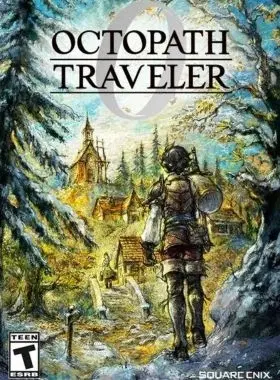
Octopath Traveler 0 PC Steam CD Key
بخار
عالميّ
Instant Download
Start from zero and discover the newest entry in the OCTOPATH TRAVELER series. Experience a story of restoration and retribution over the divine rings—an epic saga that unfolds across the realm of Orsterra.
Enjoy familiar features such as the series' HD-2D graphics, a fusion of retro pixel art and 3DCG; the player's ability to roleplay using Path Actions of their choice; and the Break and Boost system that can turn the tide of battle. Additionally, brand-new features such as character creation and town building allow you to create your own character and restore your hometown.
Features of Octopath Traveler 0
You are the protagonist of the story. Choose your appearance, voice, motions, and favorite dish with the new character creation feature!
Restore your hometown through town building. Invite companions and allies to live in a town of your creation!
Engage in exhilarating and strategic command battles. Choose from over 30 allies to form a party comprised of up to eight characters!
Use Path Actions to invite people to your town, engage in battle, and obtain items. Where you go and what you do is entirely up to you.
Equip action skills with the new skill system. These skills can be learned by allies and passed on to others.

قم بتشغيل مُشغل ألعاب Steam وتسجيل الدحول لحسابك (إذا لم تكن تمتلكه، قم بتنزيله وتثبيته من هنا)
 ;
;
في الزاوية السفلية اليسرى، انقر فوق Click + ADD A GAME، ثم اختر Activate a Product on Steam...

قم بقراءة الشروط والاحكام، ثم اضغط على I Agree / أوافق

قم بإدخال رمز لعبة Steam، ثم اضغط على Next / التالي..

انقر فوق "إنهاء".
في هذه المرحلة، يمكنك اختيار تنزيل/تثبيت اللعبة على جهاز الكمبيوتر الخاص بك الآن أو القيام بذلك في وقت لاحق. ستجد لعبتك في مكتبة Steam الخاصة بك.
انتقل إلى تنشيط منتج على Steam، وتأكد من تسجيل الدخول بالفعل إلى حساب Steam الخاص بك.
أدخل رمز منتج Steam الخاص بك في المساحة المتوفرة، ثم حدد مربع أوافق، ثم انقر فوق "Continue / متابعة".
ستتم الآن إضافة اللعبة إلى مكتبة Steam الخاصة بك.

قم بتشغيل مُشغل ألعاب Steam باستخدام البيانات التي ارسلناها إلى بريدك الإلكتروني. (إذا لم تكن تمتلكه، قم بتنزيله وتثبيته من هنا)

للحصول على رمز التحقق، قم بتسجيل الدخول باستخدام رابط تسجيل الدخول عبر البريد الإلكتروني هنا باستخدام بيانات اعتماد البريد الإلكتروني المرسلة إلى عنوان بريدك الإلكتروني واكتب رمز التحقق على Steam
لمساعدتك في تمكين Steam Family Sharing ولعب هذه اللعبة على حساب Steam الرئيسي الخاص بك، يرجى اتباع التعليمات الموجودة في هذا الفيديو.
ملحوظة: بسبب القيود الفنية، قد تكون بعض ألعاب Steam غير متاحة للمشاركة. على سبيل المثال، لا يمكن مشاركة العناوين التي تتطلب مفتاحًا أو حسابًا أو اشتراكًا إضافيًا لجهة خارجية من أجل اللعب بين الحسابات.
لقد أصبحت الآن لديك ملكية هذا الحساب بنسبة 100%، فلا تتردد في تغيير جميع التفاصيل الشخصية في هذا الحساب. يمكننا إضافة المزيد من الألعاب إلى حسابك بأسعار رخيصة في المستقبل. فقط أخبرنا عن لعبة Steam التي ترغب في شرائها وسنقدم لك عرضًا مخصصًا.
هل تواجه مشكلة في استرداد الرمز الخاص بك؟ تحقق من إصلاح الأخطاء الشائعة لـ Steam.
كن أول من يُقيّم هذا المنتج!


Receive 100% genuine software keys, backed by our Flawless Activation guarantee for complete peace of mind.
Your software key is delivered directly to your email inbox within seconds of completing your purchase. No waiting.
Our dedicated support team is available around the clock via live chat and email to assist with installation and activation.
Our 30-day money-back guarantee ensures a fast refund or replacement if your key is faulty or incompatible.
The price you see is the final price you pay. No hidden service fees or surprise charges at the checkout.
Earn valuable points with every purchase and redeem them for real discounts on future software.
A proven track record with thousands of verified, positive reviews from real customers across the globe.

أفضل بائع
640+ تم البيع

أفضل بائع
530+ تم البيع

فاست موفر
432+ تم البيع
لماذا يحبنا عملاؤنا
تم تقييمه بشكل ممتاز
Saved a ton on Office 2021. Got my key immediately and it activated without a hitch. EF is the real deal!
by Verified Buyer
Bought a PS Plus membership, code in seconds. Had a minor issue, support resolved it fast. Very impressed!
by Verified Buyer
Doubted a deal this good, but a friend insisted. My Windows 10 Pro key arrived instantly and works perfectly.
by Verified Buyer
Bought Office 2021 at 2am and got my key immediately. I didn’t expect delivery at that hour. Outstanding!
by Verified Buyer
Overseas but still got my code instantly. Xbox Live Gold code redeemed with no region issues. Impressed!
by Verified Buyer
Got Windows 10 Pro & Office 2021 far cheaper than retail. Both keys arrived instantly and activated fine.
by Verified Buyer
Got a Steam game key cheap. Code came instantly, I was playing within minutes of purchase. Can’t beat that!
by Verified Buyer
Bought Windows 11 Pro dirt cheap. Key arrived instantly and activated without issues. Truly 100% legit!
by Verified Buyer
First purchase, was cautious. Fast delivery and legit PS Plus code won me over. I’ll be a repeat buyer.
by Verified Buyer
Bought an Amazon gift card at a discount. Code arrived in seconds and worked perfectly. A lifesaver!
by Verified Buyer
Bought an Xbox Game Pass code at an unbeatable price. Arrived in my email within seconds. Beyond satisfied!
by Verified Buyer
Windows 11 Pro key seemed too cheap. 80k+ reviews convinced me to try them. Code arrived instantly and worked.
by Verified Buyer
انضم لجيشنا للحصول على مميزات الأعضاء الحصرية
سلة المشتريات الخاصة بك فارغة!
Add your favourite games & software to get started.
شاهد أفضل الكتب مبيعاً


Convert coins into real savings at checkout!
Check Dashboard New here? اشترك & Track ProgressEarn EF Coins by completing tasks — build up your balance and turn them into wallet credit!

كن عضوًا في مجتمع إلكترونيك فرست

اشتر منتج

أضف لمسة شخصية لاسمك المستعار

أضف صورة شخصية

قم بإضافة منتج لقائمة التمني الخاصة بك

اطلب منتجًا قبل تاريخ إصداره

اشتر 10 منتجات

اشتر أكثر من 20 منتجًا

عضو لأكثر من 6 أشهر

عضو لأكثر من سنة

اكتب مُراجعة

مشاركة