
Rated
based on
85,278+
85.3k
reviews
Instant Download
100% Money Back Guarantee
24/7 Support
 Steam
Steam
 Worldwide
 Instant Download
Instant Download
100% Money Back Guarantee
24/7 Support
Steam
Worldwide
Instant Download
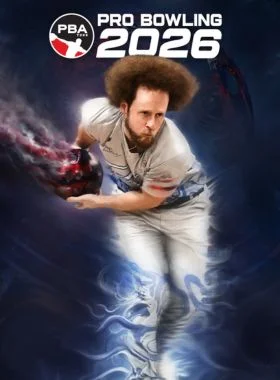
PBA Pro Bowling 2026 is a skill driven bowling simulation with authentic ball motion, real oil patterns, and evolving lane conditions. From your first local leagues to competing with the pros, every throw comes down to strategy and execution.
Real World Ball and Oil Physics That Reward Skill
Realistic ball motion shaped by oil patterns, lane friction, and simulation grade physics
Oil pattern breakdown and carrydown change ball reaction over time
Adjust line, speed, rev rate, and ball choice as conditions evolve
From Local Leagues to the PBA Tour
Progress through a full single player career, starting in local leagues and advancing to the PBA Tour
Build your ball arsenal from 270+ officially licensed bowling balls
Customize your bowler with a full character creator and 120+ apparel items to collect
Improve Your Skills Across Multiple Modes
Traditional Tenpin bowling alongside Candlepin and Duckpin bowling
Skill focused challenges like Strike Derbies, Spare Pickup Challenges, No Tap, and Oil Pattern Roulette
Designed for practice, competition, and mastery
Bowl Against Licensed PBA Pros in Authentic Venues
Compete against over 30 licensed PBA professionals
Bowl across 13 unique venues inspired by real and imaginative locations
Broadcast style presentation and commentary from the TV broadcast team of Rob Stone and Hall of Famer Randy Pedersen enhances the professional atmosphere
Prove Your Skill Against Others
Compete in online multiplayer with friends and rivals around the world
Bowl with or against up to 4 friends in couch local multiplayer
Designed for both newcomers and experienced bowlers, PBA Pro Bowling 2026 balances approachable gameplay with rewarding depth and long term progression. Do you have what it takes to bowl with the greats?

Launch the Steam client and log in to your Steam account. (If you don't have it, download and install it from here)

On the lower-left corner, click on Click + ADD A GAME, then select Activate a Product on Steam...

A Product Activation window will pop up, just click Next.

Read the Agreement, and click I Agree.

Enter the Steam game code and hit Next.

Click Finish.
At this point, you can choose to download/install the game on your PC now or do it at a later time. You will find your game in your Steam Library.
Go to Activate a Product on Steam, make sure you are already logged in to your Steam account.
Enter your Steam product code on the space provided, tick the I agree box, then click Continue.
The game will now be added to your Steam Library.

Launch Steam Client using the Steam credentials sent to your email address. (If you don't have it, download and install it from here)

To get the verification code, log in to the Email Login URL here using the Email Credentials sent to your email address and type the verification code on Steam.
To help you enable Steam Family Sharing and to play this game on your main Steam account, please follow the instructions in this video.
NOTE: Due to technical limitations, some Steam games may be unavailable for sharing. For example, titles that require an additional third-party key, account, or subscription in order to play cannot be shared between accounts.
You now have 100% ownership of this account, feel free to change all personal details on this account. We can add more games to your account for cheap prices in the future. Just let us know which Steam game you would like to buy and we will make a custom offer for you.
Having trouble redeeming your code? Check out the Fix Common Errors for Steam.
Be the first to review this product!
Why our Customers Love Us
Rated Excellent
Saved a ton on Office 2021. Got my key immediately and it activated without a hitch. EF is the real deal!
by Verified Buyer
Bought a PS Plus membership, code in seconds. Had a minor issue, support resolved it fast. Very impressed!
by Verified Buyer
Doubted a deal this good, but a friend insisted. My Windows 10 Pro key arrived instantly and works perfectly.
by Verified Buyer
Bought Office 2021 at 2am and got my key immediately. I didn’t expect delivery at that hour. Outstanding!
by Verified Buyer
Overseas but still got my code instantly. Xbox Live Gold code redeemed with no region issues. Impressed!
by Verified Buyer
Got Windows 10 Pro & Office 2021 far cheaper than retail. Both keys arrived instantly and activated fine.
by Verified Buyer
Got a Steam game key cheap. Code came instantly, I was playing within minutes of purchase. Can’t beat that!
by Verified Buyer
Bought Windows 11 Pro dirt cheap. Key arrived instantly and activated without issues. Truly 100% legit!
by Verified Buyer
First purchase, was cautious. Fast delivery and legit PS Plus code won me over. I’ll be a repeat buyer.
by Verified Buyer
Bought an Amazon gift card at a discount. Code arrived in seconds and worked perfectly. A lifesaver!
by Verified Buyer
Bought an Xbox Game Pass code at an unbeatable price. Arrived in my email within seconds. Beyond satisfied!
by Verified Buyer
Windows 11 Pro key seemed too cheap. 80k+ reviews convinced me to try them. Code arrived instantly and worked.
by Verified Buyer
Join the EF Army for exclusive member benefits





Share